Photo Scanners for Home: The Complete Buying Guide
A photo scanner for home is a flatbed or feed-through scanner for prints, and a film scanner for slides and negatives. Start with what you have, then pick the type that matches it, since a scanner built for prints can't read film.
On this page (9 sections)
- Which photo scanner fits your box?
- Photo scanners for prints: flatbed or feed-through
- Slides and negatives need a film scanner
- Documents, when the box holds papers
- Digitizing old photos, step by step
- Choosing between a scanner, a phone and a service
- A full map of ShoeboxPicks guides
- How we picked the scanners in this guide
- Which photo scanner should you buy first?
A photo scanner for home turns old prints, slides and negatives into digital files that you can keep, share and print. The right scanner depends on what's in the box, since a scanner built for prints can't read film.
This guide sorts the types of scanner, explains the choices that matter and points to the detailed picks and guides on ShoeboxPicks. Start with what you have, then move to the section that matches it.
Which photo scanner fits your box?
Most family boxes hold three kinds of material: prints, slides and negatives, and papers. Each one calls for a different scanner, so sort the box before you shop.
A flatbed or a feed-through model handles prints. A film scanner handles slides and negatives, and a document scanner handles letters, forms and receipts.
If the box holds all three, plan two or three passes. The scanner for prints does the bulk of the work, and the film scanner covers the slides and negatives.
Photo scanners for prints: flatbed or feed-through
A flatbed lays each print on glass, so you control the placement and the lid. It's the right choice for a smaller pile and a photo you want to handle with care.
A feed-through scanner pulls a stack of prints past its sensor. The Epson FastFoto FF-680W is built for that job, and Epson says it can batch up to 36 photos at once.
Our best photo scanner for old family photos compares the five best picks for prints, from a feed-through model to a budget flatbed. The best flatbed scanner for photos narrows the list to glass models only.
For a broader look across print scanners, the best photo scanner roundup covers flatbeds, feed-through and slide models in one list. If you're choosing by need rather than by model, the guide to choosing a photo scanner walks through dpi, speed and software.
Which photo scanner for old photos is the right size for your pile?
A few dozen prints suit a flatbed, and a stack of several hundred suits a feed-through model. The pile decides the type more than the brand does.
The Epson Perfection V39 II is the flatbed to watch, with 4800 dpi glass, Easy Photo Fix and stitching for big prints. The Canon CanoScan LiDE 400 is the one-cable alternative, with a USB-C port.
Compare the two Epson flatbeds and the two Canon flatbeds on the pages linked below. Each comparison answers one question that buyers ask most.
- Epson V39 II vs Canon LiDE 400: which flatbed wins?
- Epson V19 II vs V39 II: is the upgrade worth it?
- Epson FastFoto vs ScanSnap for prints
Our full reviews go deeper on the individual models, starting with the Canon CanoScan LiDE 400 review and the Epson Perfection V39 II review.
Does the Epson FastFoto scan negatives or slides?
The FastFoto doesn't scan negatives or slides. It's built for prints, Polaroid-size photos, panoramas and documents, so film needs a different scanner.
Our FastFoto negatives and slides answer explains why, and which scanner to use for film.
Slides and negatives need a film scanner
A film scanner has a holder for slides or negatives, and it's built to read light passing through the film. That's a different job from reading a print, which is why a flatbed often struggles with film.
Film scanners fall into two groups. Slide-first models take 35mm slides and some negatives, and film-first models take negatives in several formats with color software.
Our best slide scanner roundup compares four models for slides and mixed film, from the Kodak Slide N Scan to the HP HPFS500. The best film scanner roundup covers five models for negatives, including a computer-based option for careful color work.
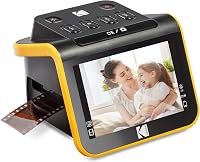
The Kodak Slide N Scan is the model that appears in both lists, and it's the one to try first for a mixed box. Our Kodak Slide N Scan review covers the model in detail.
Can a flatbed scan slides and negatives?
Only flatbeds with a transparency unit, a light that shines through the film, can read slides and negatives, and many can't. Check the specs before you plan a film batch.
Our guide to scanning negatives with a flatbed explains which setups work. The guide to scanning slides with a flatbed covers the slide side of the same question.
Documents, when the box holds papers
Old boxes often hold more than photos. Letters, bills, school papers and receipts need a document scanner, which is a different machine from a photo scanner.
A desktop feeder suits a steady stack of papers, while a portable scanner suits a few sheets at a time. Our best document scanner roundup covers the desktop side, and the best portable document scanner roundup covers the portable side.
The Epson Workforce ES-50 is a portable document scanner that suits a few sheets at a time. Our Epson ES-50 review covers the model in detail.
For a guide to choosing a document scanner, read how to choose a document scanner for home papers. The best scanner for photos and documents list covers scanners that handle both jobs.
Digitizing old photos, step by step
Digitizing a box of old photos is a process, and the scanner is only one step. Sorting, cleaning, scanning and storing each take time.
Our step-by-step guide to digitizing old photos walks through the whole job from start to finish. The best way to scan old photos at home guide covers the method for a typical family box.
Dpi is the setting most people ask about, so the best DPI for scanning old photos guide gives the numbers for each job. Most family prints look sharp at 600 dpi, and the top setting is mainly for enlargements.
Many people also ask whether scanning can damage a print, and the does scanning photos damage them guide covers the handling side of the question. A scan is a copy, so keep the original safe.
Cleaning the glass before each batch keeps specks out of every scan. Our guide to cleaning a flatbed scanner glass covers the steps, and the photo scanner to computer guide walks through connecting the scanner on Windows.
Choosing between a scanner, a phone and a service
A phone app can capture a single photo, but a scanner produces a consistent file for a whole box. The choice depends on how many photos you have and how much detail you need.
Our photo scanner vs phone app comparison explains when a phone is enough. The flatbed vs sheetfed guide covers the choice between the two main scanner types.
If you're deciding whether the cost of a scanner is worth it, the are photo scanners worth it guide answers that question for a typical family box.
A full map of ShoeboxPicks guides
Every guide on this site is linked below, grouped by what you're trying to do. Use the groups to jump to the topic you need, and come back here when the next question comes up.
Photo scanners for prints
- Best photo scanners for old family photos compares five picks for a family box of prints.
- Best flatbed scanners for photos lists glass models for single prints.
- Best photo scanner: flatbed, feed-through and slide covers all three photo-scanner types in one list.
- Best scanners for photos and documents covers scanners that handle both jobs.
- How to choose a photo scanner: DPI, speed and software is a buying guide for prints.
- Epson V39 II vs Canon LiDE 400: which flatbed wins? compares two popular flatbeds.
- Epson V19 II vs V39 II: is the upgrade worth it? checks the step up within one brand.
- Epson FastFoto vs ScanSnap: which for prints? compares a feed-through photo scanner with a document scanner.
- Canon CanoScan LiDE 400 review covers a USB-C flatbed in detail.
- Epson Perfection V39 II review covers the flatbed with Easy Photo Fix.
- Does the Epson FastFoto scan negatives or slides? answers a common film question.
How to digitize photos
- The best way to scan old photos at home describes the method for a family box.
- How to digitize old photos, step by step covers the whole job from sorting to storage.
- Best DPI for scanning old photos gives the settings for each job.
- Does scanning old photos damage them? covers handling and care.
- How to clean a flatbed scanner glass gives the steps for clean scans.
- How to scan photos to your computer on Windows covers the connection and the software.
Slides and negatives
- Can you scan negatives with a flatbed scanner? explains which setups work.
- Can you scan slides with a flatbed scanner? covers the slide side of that question.
- Best slide scanners for home use compares four models for slides and mixed film.
- Best film and negative scanners for home compares five models for negatives and film.
- Kodak Slide N Scan review covers a mixed slide and negative scanner.
Document scanners
- Best document scanners for home use covers desktop feeders.
- Best portable document scanners covers scanners that run from a cable.
- Epson Workforce ES-50 review covers a portable document scanner in detail.
- How to choose a document scanner for home papers is a buying guide for papers.
Compare and choose
- Flatbed vs sheetfed scanner: which do you need? explains the two main scanner types.
- Photo scanner vs phone app: is a scanner worth it? weighs a scanner against a phone.
- Are photo scanners worth it? answers the cost question for a typical box.
How we picked the scanners in this guide
We compared the specs, features and connection details each maker gives. Our score weighs specs, features and buyer feedback against what you're shopping for.
Each pick comes with a short note on who it suits, and each roundup lists its picks by score. A product scores the same across the site, so a model you see in two guides carries the same number in both.
Which photo scanner should you buy first?
Buy a flatbed or a feed-through photo scanner first if prints are the bulk of the box. Pick the Epson FastFoto FF-680W for a big stack, and the Epson Perfection V39 II for a flatbed with one-click color fixes.
Add a film scanner once you know how many slides and negatives you have. The Kodak Slide N Scan covers a mixed box, and the Plustek OpticFilm 8300i Ai suits careful color work on a computer.
For papers, a portable document scanner covers a few sheets at a time. Whichever you choose, check your computer's operating system and ports before you order.
Sort the box, count the pieces and decide what matters most, then pick the scanner that matches the pile. The rest of this guide is there when the next question comes up.
Frequently asked questions
What is a photo scanner for home?
A photo scanner for home digitizes old prints, slides or negatives so you can keep, share and print them. Flatbeds and feed-through models handle prints, while film scanners read slides and negatives.
Which photo scanner is best for old family photos?
For a big stack of prints, the Epson FastFoto FF-680W is the fastest pick here. For a flatbed that handles one print at a time, the Epson Perfection V39 II is the strongest choice.
Can one scanner handle prints, slides and negatives?
Rarely. Most photo scanners read prints only, while film scanners read slides and negatives, so a mixed family box usually needs two scanners or a combined plan.
Do I need a computer for a photo scanner?
Most flatbeds and feed-through models connect to a computer, and some film scanners save to an SD card and show scans on their own screen. Check the connection and the software before you buy.