5 Best Photo Scanners for Old Family Photos (October 2026)
The best photo scanners for old family photos include the Epson FastFoto FF-680W for a big shoebox of prints, the Epson Perfection V39 II Flatbed Photo Scanner for faded prints and big images, and the Canon CanoScan LiDE 400 for a one-cable setup.
On this page (9 sections)
- Five photo scanners for old family photos, in detail
- Side by side: the five photo scanners on weight, connection and resolution
- How we picked these five photo scanners
- Which photo scanner for old photos fits your pile?
- Settings to check before you scan old prints
- How to protect fragile prints while you scan
- Which scanner suits a family archive project
- What a photo scanner can't fix in an old print
- Which photo scanner for old family photos should you buy?
The best photo scanner for old family photos is the Epson FastFoto FF-680W for a big stack of prints, and the Epson Perfection V39 II for a flatbed. A flatbed lays one print at a time on glass, while a feed-through model pulls a stack past its sensor.
We compared five scanners that fit loose prints, from the FastFoto's feed to a one-cable flatbed for a small desk. The list runs from the top score down, and each pick has a short note on who it suits.
Our picks at a glance
-
1

-
2
 Best for faded prints and big images
Epson Perfection V39 II Flatbed Photo Scanner
8.4/10 our score
See it on Amazon -
3

- 4
 Check it
Epson Perfection V19 II Flatbed Photo Scanner
Best for a budget flatbed for prints - 5
 Check it
Plustek ePhoto Z300 Photo Scanner
Best for fast, one-at-a-time prints
Five photo scanners for old family photos, in detail
The FastFoto scores highest because it handles a stack of prints in one run. The other four each suit a different desk, budget and pile size.
Epson FastFoto FF-680W
- Duplex scanning captures the back of each print
- Up to 36 photos in one batch, per Epson
- Wi-Fi and USB connection
- Handles Polaroids, panoramas and photos up to 8 x 10 in
- Carrier sheet and microfiber cloth in the box
The pick for a stack of family prints, since it feeds one photo after another and captures both sides in one pass. It costs more than the flatbeds here and has no film holder.
Pros
- Up to 1 photo per second, per Epson
- Captures handwriting on the back of a print
- Handles Polaroids, panoramas and documents
Cons
- Costs more than the flatbeds in this list
- Scans prints only, so negatives and slides need another scanner
Epson calls the FastFoto FF-680W the world's fastest personal photo scanner, and it's built for a box of prints. Epson gives a speed of about one photo per second at 300 dpi.
You load a stack into the feeder, and Epson says it can batch up to 36 photos at a time. That's a lot of prints to scan without lifting a lid between them.
The duplex pass captures the back of a photo in the same scan. Handwritten names and dates on the back come through, which matters for a family archive.
Epson gives three resolution settings: 300 dpi for sharing, 600 dpi TIFF for archiving and 1200 dpi for enlarging. You pick the one that suits each job.
The FastFoto handles Polaroids, panoramas, postcards and photos up to 8 x 10 inches. It has no film holder, so negatives and slides need a different scanner.
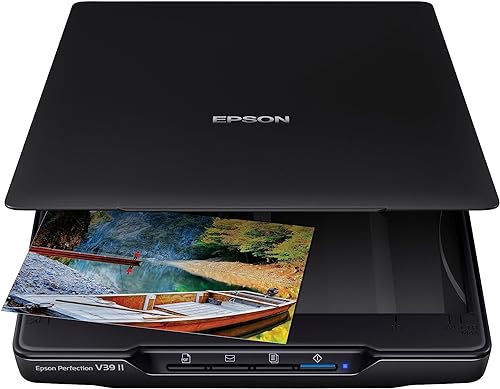
Epson Perfection V39 II Flatbed Photo Scanner
- 4800 dpi optical resolution
- Easy Photo Fix restores color in one click
- Stitches oversized images together
- Sends scans to cloud storage services
A compact flatbed with 4800 dpi optical resolution and a one-click fix for faded color. Each print sits on the glass by itself, which suits old photos that need care.
Pros
- Easy Photo Fix restores faded color, per Epson
- Stitching handles prints bigger than the glass
- Compact enough for a desk
Cons
- One print per pass, so a large box takes time
- No wireless connection
The Perfection V39 II is a flatbed with 4800 dpi optical resolution. It's the best pick here for a single print that needs care, because you place each one on the glass yourself.
Epson's Easy Photo Fix restores color on a faded print with one click. That's a useful step for prints that have turned yellow or lost their contrast.
The V39 II stitches oversized images together, so a large print scanned in parts comes out as one file. Its software also sends scans to cloud storage services.
It weighs 3.1 pounds and connects over USB. The lid is high-rise and removable, so it also lifts for a thicker item.
A flatbed takes one print per pass, so a box of a few hundred prints takes a while. If you have a smaller pile, that trade is fine.
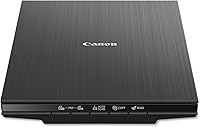
Canon CanoScan LiDE 400
- 4800 x 4800 dpi optical resolution
- One USB-C cable for data and power
- EZ buttons and auto scan mode
- Scans up to letter and A4 size
A flatbed that gets its data and power over one USB-C cable. Canon says it also removes dust and restores color on older photos.
Pros
- One USB-C cable for data and power
- EZ buttons and auto scan mode
- Dust removal and color restore, per Canon
Cons
- USB only, with no wireless option
- Canon's compatibility notes stop at Windows 10 and macOS High Sierra
Canon's CanoScan LiDE 400 is a flatbed with 4800 x 4800 dpi optical resolution. Its single cable suits a crowded desk.
It connects with a USB-C cable that carries both data and power. There's no separate power brick to plug in, so the desk stays tidy.
Canon's EZ buttons and auto scan mode detect what's on the glass. Canon also names dust removal and color restore among its image enhancements.
It scans letter and A4 sheets, so the same scanner handles a few paper items. It doesn't have a wireless option, so the USB-C cable is the only connection.
Canon's compatibility notes stop at Windows 10 and macOS High Sierra. Check the current Windows and Mac versions on Canon's support page before you buy.
Epson Perfection V19 II Flatbed Photo Scanner
- 4800 dpi optical resolution
- Easy Photo Fix restores faded color
- High-rise removable lid for thicker items
- USB powered
It has the same 4800 dpi glass and body as the V39 II, with a shorter feature list. It suits a flatbed for a modest pile of prints.
Pros
- Same 4800 dpi and body size as the V39 II
- Easy Photo Fix for faded color
- USB powered, so one cable does the job
Cons
- Fewer extras than the V39 II, with no stitching or cloud sending in its feature list
- One print per pass, like any flatbed
The Perfection V19 II shares the V39 II's 4800 dpi optical resolution and its body size. It's the budget flatbed here, and it suits a few dozen prints better than a full box.
Easy Photo Fix works on this model too, so faded color gets the same one-click treatment.
The V19 II has a high-rise, removable lid that lifts for thicker items, such as a page from a bound book. It's USB powered, so the cable is the only connection you need.
Its feature list is shorter than the V39 II's. It leaves out stitching and cloud sending, which are the extras that make the V39 II the better pick for big images.
Plustek ePhoto Z300 Photo Scanner
- Feeds 3 x 5, 4 x 6, 5 x 7 and 8 x 10 in prints
- Also takes letter and A4 paper
- Optical resolution up to 600 dpi
- Built-in image enhancement
You slide each print in by hand, and Plustek says it's quicker than a flatbed for a stack of 4 x 6 prints. It's a fit for a family with a moderate pile who wants a quick pass on each one.
Pros
- Quick for 4 x 6 prints, per Plustek
- Takes prints up to 8 x 10 in
- Enhancement tools built in
Cons
- Each print still goes in by hand
- One side per pass, so a print with writing on the back needs a second pass
The Plustek ePhoto Z300 takes a different route. You slide each print into the feed by hand, and Plustek says it's quicker than a flatbed for a stack of 4 x 6 prints.
It takes 3 x 5, 4 x 6, 5 x 7 and 8 x 10 inch prints, plus letter and A4 paper. Plustek gives its optical resolution as up to 600 dpi.
Plustek says a 4 x 6 print takes about 2 seconds at 300 dpi, and an 8 x 10 takes about 5 seconds. Those are the maker's figures, so time a few of your own prints before you plan a big job.
The enhancement tools can restore faded color with a click, according to Plustek. The Z300 scans one side per pass, so a print with writing on the back goes through a second time, and Plustek says its software can merge the two images.
Side by side: the five photo scanners on weight, connection and resolution
The FastFoto is the only one here with Wi-Fi, and it's also the heaviest at 8.2 pounds. The other four weigh 3.1 to 3.6 pounds, so choose them by features, not weight.
| Product | Best for | Weight | Connection | Resolution | Our score |
|---|---|---|---|---|---|
| Epson FastFoto FF-680W | a big shoebox of prints | 8.2 lb | Wi-Fi and USB | Up to 600 dpi, 1200 dpi for enlarging | 8.7 |
| Epson Perfection V39 II Flatbed Photo Scanner | faded prints and big images | 3.1 lb | USB | 4800 dpi optical | 8.4 |
| Canon CanoScan LiDE 400 | a one-cable setup | 3.6 lb | USB-C, one cable for data and power | 4800 x 4800 dpi optical | 8.2 |
| Epson Perfection V19 II Flatbed Photo Scanner | a budget flatbed for prints | 3.1 lb | USB, USB powered | 4800 dpi optical | 7.8 |
| Plustek ePhoto Z300 Photo Scanner | fast, one-at-a-time prints | 3.3 lb (1.5 kg) | USB | Up to 600 dpi optical | 7.3 |
Resolution figures come from each maker, so read them as claims. Higher dpi gives a bigger file and more detail to zoom into, but it also takes longer to scan.
How we picked these five photo scanners
We compared the specs, features and file options each maker gives for prints. Our score weighs specs, features and buyer feedback against what you're shopping for.
Each pick faced the same questions:
- How many prints can it handle in one sitting?
- Does it scan one print at a time on glass, or feed a stack?
- What resolution and file options does the maker give?
- How much desk space and cable does it need?
- What software and extras come with it?
Film and documents are left for other posts, so this list covers prints only. For negatives and slides, see the best slide scanner guide.
Here's how the scores landed:
- FastFoto FF-680W, 8.7: handles a stack, scans both sides and offers three file settings, but it costs more than the flatbeds.
- Perfection V39 II, 8.4: a strong flatbed with Easy Photo Fix, stitching and cloud sending.
- CanoScan LiDE 400, 8.2: simple, with one USB-C cable, but its compatibility notes stop at older systems.
- Perfection V19 II, 7.8: the V39 II's glass and body with fewer features.
- ePhoto Z300, 7.3: quick for 4 x 6 prints, but each one still goes in by hand.
Which photo scanner for old photos fits your pile?
A stack of several hundred prints fits the FastFoto, while a smaller pile fits a flatbed. The FastFoto is built for volume, since it takes prints one after another and captures both sides.
A flatbed suits a fussier job, such as one family photo you want to place and check on the glass. The V39 II and LiDE 400 both give you that control.
If your pile is mixed, with prints in envelopes and loose snapshots in a drawer, sort it first. Scan the matching prints together, so each batch uses the right settings.
Whichever scanner you pick, keep the originals in a safe place and back up the scans to a second drive. For the full method, read our guide to scanning old photos at home.
Settings to check before you scan old prints
Most of the quality comes from three settings: resolution, color mode and file type. Pick them before the first print, so the whole batch matches.
The photo scanner settings that matter for old photos
Resolution decides how much detail the file keeps. Epson's 300 dpi setting suits sharing, and its 600 dpi TIFF setting suits archiving.
Scan old prints in color, even when they look gray or brown. A color scan keeps the tint of the paper, and you can still make a black and white copy later.
Save the archive copy as a TIFF if your scanner allows it, and make a smaller JPEG for sharing.
Keep the TIFF so you can rescan or edit later. Our guide to the best DPI for scanning old photos goes deeper on the numbers.
How to protect fragile prints while you scan
The FastFoto ships with a carrier sheet, which Epson says is for delicate photos. Use it for any print that's soft, brittle or curled at the edges.
On a flatbed, close the lid gently and keep the glass clean with a soft cloth. Our flatbed cleaning guide covers the steps.
Very fragile, stuck-together or water-damaged prints may need a professional. A scan is a copy, so it can't stop the original from aging.
Which scanner suits a family archive project
A family archive usually grows one batch at a time, so the scanner should fit how often you'll sit down to work. Here's how the five models map to the way families tend to work.
Photo scanner for old photos in a family project
If one person keeps the archive, the FastFoto suits a weekend project. Its Epson app adds voice notes and text to each photo, so the stories travel with the picture.
If several relatives each bring a few prints, a flatbed is easier to keep going. Each print gets a short, careful pass, and nothing needs a stack or a feed tray.
If the family wants copies in the cloud, the V39 II's cloud sending saves a step. The V19 II and LiDE 400 need the least setup, so they suit a family member who doesn't want to learn new software.
What a photo scanner can't fix in an old print
A scanner can't repair a torn corner, a water stain or a cracked print. Color restore and dust removal help with fading and specks, but they can't bring back detail the print has lost.
Enhancement tools change the file, not the print. Keep the original, and treat an enhanced copy as a separate file, so you can always go back to the raw scan.
Which photo scanner for old family photos should you buy?
Buy the FastFoto FF-680W for a big stack of prints, and the Epson Perfection V39 II for a flatbed that gives you control over each print. If the budget is tight, the V19 II covers the basics.
If you also have slides or negatives, check the best film scanner list before you buy. A flatbed won't replace a film scanner for those, and a photo scanner is only half of the job.
Measure your desk, count your prints and choose the scanner that matches the pile, not the other way round.
For how the other scanner types fit a family box, start with our photo scanner buying guide.
Our top 3 picks at a glance
-
1
-
2
Best for faded prints and big images
Epson Perfection V39 II Flatbed Photo Scanner
8.4/10 our score
See it on Amazon -
3
Frequently asked questions
What is the best photo scanner for old family photos?
For a big stack of prints, the Epson FastFoto FF-680W is the best fit, because it feeds photos one after another and scans both sides. For a flatbed that handles one print at a time, the Epson Perfection V39 II is the pick, with 4800 dpi and a one-click color fix.
Is a flatbed or a feed-through scanner better for old photos?
A flatbed suits a smaller pile and a print you want to place with care, since you control each one on the glass. A feed-through scanner like the FastFoto suits a large stack, because it moves prints through faster.
Can a photo scanner work with Windows 11 or a Mac?
Check the maker's support page before you buy. Canon's compatibility notes for the LiDE 400 stop at Windows 10 and macOS High Sierra, so confirm your system is covered.
What resolution should I use for old photos?
Epson gives 300 dpi for sharing, 600 dpi TIFF for archiving and 1200 dpi for enlarging on the FastFoto. Our guide to the best DPI for scanning old photos explains how to pick one for each job.
Can a scanner damage an old print?
Scanning is safe for most prints, but very fragile, curled or stuck-together photos may need a professional. Keep the original print and back up the scans to a second drive.