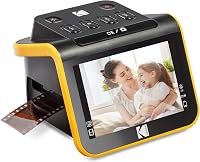
4 Best Slide Scanners for Home Use (October 2026)
The best slide scanners for home use include the KODAK Slide N Scan Film and Slide Scanner for a first slide scanner, the KODAK Slide N Scan Max Film Scanner for a bigger screen, and the KODAK SCANZA Film and Slide Scanner for a box with many film sizes.
On this page (11 sections)
- The four best slide scanners for home use, in detail
- What to check before you order a slide scanner
- Side by side: slide scanners on screen, connection and storage
- What a dedicated slide scanner does that a flatbed doesn't
- What a slide scanner does with a negative
- Slide scanner software and file sizes
- How we picked these four slide scanners
- Slide scanners for a mixed box of film
- Setting up a slide scanner for the first batch
- Tips for scanning a box of slides at home
- Which slide scanner for home use should you buy?
The best slide scanner for home use is the Kodak Slide N Scan, which digitizes 35mm slides and most negatives with a 5-inch screen to check each frame. We compared four models on screen size, film types, storage and how each one feeds a long run of slides.
The Kodak Slide N Scan leads the list, and the Slide N Scan Max sits right behind it for a bigger screen. Each pick has a short note on who it suits.
Our picks at a glance
-
1
 Best for a first slide scanner
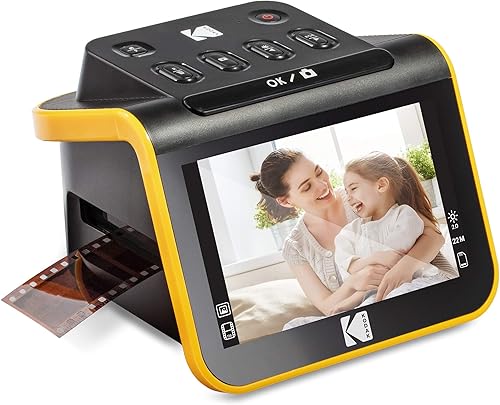
KODAK Slide N Scan Film and Slide Scanner
8.2/10 our score
See it on Amazon -
2

-
3
 Best for a box with many film sizes
KODAK SCANZA Film and Slide Scanner
7.7/10 our score
See it on Amazon
- 4
 Check it
HP Film & Slide Scanner HPFS500
Best for touchscreen editing
The four best slide scanners for home use, in detail
The Slide N Scan scores highest because it covers the common slide and negative sizes with a clear screen and a simple routine. The other three each suit a different box of film.
KODAK Slide N Scan Film and Slide Scanner
- 22MP output for 135, 110 and 126 film and 50mm slides
- 5-inch LCD with a gallery mode
- Quick-feed tray for continuous loading
- Needs an SD card up to 32GB (sold separately), and also connects to a computer over USB-C
The Kodak model most people start with, with a 5-inch screen and a quick-feed tray for slides and negatives. It's the slide scanner to try first when you have a mixed box.
Pros
- Handles 135, 110 and 126 film plus 50mm slides
- Quick-feed tray speeds up a long run of slides
- Large 5-inch screen to check each frame
Cons
- SD card sold separately
- Smaller screen than the Slide N Scan Max
Kodak's Slide N Scan is a 22MP film and slide scanner with a 5-inch LCD. The screen shows each frame before you scan it, so you can line up the slide and check the result.
It handles 135, 110 and 126 film, and it takes 50mm slides with a holder in the box. Kodak includes adapters for the smaller film sizes.
The quick-feed tray moves slides one after another, which keeps a long batch moving. You don't have to reposition each frame by hand.
Kodak says you must have an SD card (up to 32GB) to operate it, and the card isn't in the box. The scanner also connects to a computer over USB-C, weighs 16 ounces and fits on a desk without much space.
KODAK Slide N Scan Max Film Scanner
- 7-inch tilting LCD
- Handles 135, 110 and 126 film
- Saves directly to SD or SDHC cards up to 32GB
- Quick-feed tray for continuous scanning
The same Kodak approach with a larger 7-inch tilting screen. It also works as a digital picture frame, so you can flip through scans without a computer.
Pros
- 7-inch screen is easier to read than a 5-inch one
- Saves to SD without a computer
- Tilting screen for a comfortable view
Cons
- SD card is sold separately
- Costs a little more than the Slide N Scan
The Slide N Scan Max uses the same tray and the same film sizes, 135, 110 and 126, with a larger 7-inch screen. That screen tilts, so you can angle it for a comfortable view.
Kodak says the Max saves directly to SD or SDHC cards up to 32GB, so you can scan without a computer once a card is in. The screen also doubles as a digital picture frame, which lets you flip through the results.
The Max is the better choice for someone who wants to check each frame on a bigger display. It's the same weight as the Slide N Scan, at 16 ounces.
The SD card is sold separately, so budget for one before you start a batch. A computer link runs over USB.
KODAK SCANZA Film and Slide Scanner
- Converts 35mm, 126, 110, Super 8 and 8mm film to JPEG
- 3.5-inch tilting LCD
- Film inserts and adapters for several formats
- Film cleaning brush included
A compact Kodak scanner with inserts for several film sizes, including Super 8 and 8mm. It suits a box with more than one kind of film in it.
Pros
- Handles 35mm, 126, 110, Super 8 and 8mm
- Film inserts and adapters in the box
- Cleaning brush included for the film and light box
Cons
- Smaller 3.5-inch screen
- Kodak says it won't convert film formats outside its list
The Kodak Scanza covers more film types than the others here. It converts 35mm, 126 and 110 film, plus Super 8 and 8mm, into JPEG files.
The Scanza's screen is a 3.5-inch tilting LCD, which is smaller than the Slide N Scan's. It's compact, and the film inserts and adapters cover several formats in one box.
Kodak says the Scanza takes up to 128GB of SD card, which you buy separately. It connects over HDMI or USB, and the HDMI cable and USB power cable are in the box.
Kodak also includes a film cleaning brush in the box. Kodak notes the scanner won't convert film formats outside its list, so check your box before you buy.
HP Film & Slide Scanner HPFS500
- 5-inch all-angle touchscreen
- Handles 135, 126 and 110 negatives and slides
- Quick-load tray for batch scanning
- SD card slot and USB-C connection
A touchscreen slide scanner that HP says works without a computer. It's a good pick if you want to tap through a slide and adjust a scan on the spot.
Pros
- Touchscreen for quick edits
- Works without a computer, per HP
- Quick-load tray for batches
Cons
- HP's 22MP figure is interpolated from a 13MP sensor
- Fewer film types than the Scanza
HP's HPFS500 is a slide scanner built around a 5-inch touchscreen. You tap to preview and adjust a scan on the scanner itself, which is handy for a box of mixed frames.
It handles 135, 126 and 110 negatives and positive slides. HP says it works without a computer, so you can scan and save to an SD card on the desk.
HP gives it a 13MP CMOS sensor with 22MP interpolation. Interpolated resolution adds pixels by estimation, so treat any megapixel number on these units as file size, not extra detail.
The quick-load tray speeds up batches, and the scanner weighs 13.4 ounces. It connects with USB-C, which is a newer port on most computers.
What to check before you order a slide scanner
Start with the film sizes in your box, since a scanner that misses one size leaves those frames behind. Look at the slide mounts and the negative strips first, and note whether you have 35mm, 126, 110, Super 8 or 8mm film.
Next, check how the scans leave the scanner. Some models save to an SD card, and others need a computer over USB or HDMI.
An SD card is almost always sold separately, so add it to your list before you buy.
Then look at the screen. A bigger screen makes it easier to line up each frame and spot a speck of dust before you scan it.
Last, check the box for film inserts, adapters and a cleaning brush. Those extras save a trip to the store partway through a long batch.
Side by side: slide scanners on screen, connection and storage
The Kodak Slide N Scan and Max share the same film sizes and a quick-feed tray. The Scanza is the compact pick for mixed film, and the HP has the touchscreen.
| Product | Best for | Screen | Connection | Storage | Our score |
|---|---|---|---|---|---|
| KODAK Slide N Scan Film and Slide Scanner | a first slide scanner | 5 in LCD | USB-C and HDMI | SD card up to 32GB, sold separately | 8.2 |
| KODAK Slide N Scan Max Film Scanner | a bigger screen | 7 in tilting LCD | USB | SD or SDHC card up to 32GB, sold separately | 7.9 |
| KODAK SCANZA Film and Slide Scanner | a box with many film sizes | 3.5 in TFT LCD | HDMI and USB | SD card up to 128GB, sold separately | 7.7 |
| HP Film & Slide Scanner HPFS500 | touchscreen editing | 5 in touchscreen | USB-C | SD card or a computer, per HP | 7.1 |
Film sizes are the first thing to check, and they aren't in the table. The Scanza covers Super 8 and 8mm, while the other three stop at 135, 126 and 110 film and slides.
Screen size matters for a long batch. The Max's 7-inch tilting screen is the largest here, and the Scanza's 3.5-inch screen is the smallest.
What a dedicated slide scanner does that a flatbed doesn't
A slide scanner holds the slide in a film holder and lights it from behind. A flatbed needs a transparency unit to do the same, and many models, including the flatbeds on this site, don't include one.
For a full box, a dedicated slide scanner keeps the work fast and the frames aligned. Our guide to scanning slides with a flatbed explains when a flatbed is enough.
What a slide scanner does with a negative
A slide is a positive image on film, so the scanner reads it as a picture. A negative is inverted, with dark areas where the photo is light, so the software has to flip the tones.
Color negatives also carry an orange cast from the film base. Most of the scanners here handle the flip and the cast in software, but check the software's options before you start a batch of negatives.
Slide scanner software and file sizes
Each scanner saves a JPEG by default, and Kodak's software can crop, resize and convert a scan with one touch. That keeps the work simple for a first batch.
These units photograph each frame with a built-in camera sensor. They suit quick, good scans for sharing, not archive-grade copies of your best slides.
A 22MP file is large, and a box of several hundred slides adds up quickly. Plan for a bigger drive or a cloud folder before a long run, and keep a second copy off the scanner's card.
How we picked these four slide scanners
We compared the film sizes, screen size, storage and connection each maker gives. Our score weighs specs, features and buyer feedback against what you're shopping for.
Each scanner faced the same questions:
- Which film types and slide sizes does it handle?
- How big is the screen for checking each frame?
- Can it save to an SD card, a computer or both?
- How fast does the tray move a batch?
- What comes in the box, such as adapters and a brush?
The scores don't reward a lower price on its own. A cheaper scanner still needs the right film sizes and a usable screen to earn a higher score.
Here's how the scores landed:
- Slide N Scan, 8.2: the common film sizes, a clear 5-inch screen and the simplest routine.
- Slide N Scan Max, 7.9: the same film sizes on a bigger tilting screen, with SD saving.
- Scanza, 7.7: the widest film range, with Super 8 and 8mm, on a smaller screen.
- HPFS500, 7.1: a touchscreen and no-computer saving, with a sensor figure that needs a closer look.
Slide scanners for a mixed box of film
Best slide scanner for each kind of box
A mixed box of slides and negatives points to the Scanza or the Slide N Scan. Both take the common 35mm sizes, and the Scanza adds Super 8 and 8mm.
A box that's mostly slides suits the Slide N Scan Max, since the larger screen makes each frame easier to check. A touchscreen suits someone who wants to tap through each frame, which is the HPFS500's strength.
Setting up a slide scanner for the first batch
Place the scanner on a flat surface near an outlet, and near your computer if the model needs one. Insert the holder for your first film type before you switch the scanner on.
Run one slide through first, and check it on the screen at full size. If the color or focus looks off, change the settings before you scan the rest of the box.
Label each slide holder by film type, so you don't mix the inserts when you switch formats. That habit saves a lot of retries on a long run.
Tips for scanning a box of slides at home
Handle each slide by its edges, and keep the mount clean of fingerprints. Oil from skin can show up on a scan as a soft smudge.
Clean the holders and the glass before each batch, using the brush the scanner supplies. Our guide to the best photo scanner for old photos covers the same care steps for prints.
Dust on a slide shows as a bright speck in the scan, and it's easy to miss on a small screen. Check each batch on a larger display after the scan, not only on the scanner's own screen.
Scan in small batches, and label each one as you go. Name the files with the date of the slide if you know it, and the subject if you don't.
Keep the originals in a dry, cool place, and back up the scans to a second drive.
A scan is a copy, so keep the slide box safe too. Sort the slides by film type and date before you begin, so the batch runs in order.
Scan the best-quality slides first, so you know the scanner works before a difficult batch.
Which slide scanner for home use should you buy?
Buy the Kodak Slide N Scan if you want the most common film sizes and a clear screen. Buy the Slide N Scan Max if the screen size matters more to you.
Buy the Scanza if the box includes Super 8 or 8mm film. Choose the HPFS500 if a touchscreen matters more than the highest score.
If your box holds negatives as well as slides, read the best film scanner guide before you order.
For how slide scanners fit with print scanners and document scanners, see our photo scanner buying guide.
Our top 3 picks at a glance
-
1
Best for a first slide scanner
KODAK Slide N Scan Film and Slide Scanner
8.2/10 our score
See it on Amazon -
2
-
3
Best for a box with many film sizes
KODAK SCANZA Film and Slide Scanner
7.7/10 our score
See it on Amazon
Frequently asked questions
What is the best slide scanner for home use?
The Kodak Slide N Scan is the best starting point, with a 5-inch screen, a quick-feed tray and 22MP scans of slides and negatives. If you want a bigger screen, the Kodak Slide N Scan Max is the next step up.
Can a slide scanner scan negatives too?
Most of the slide scanners here also take negatives, including the Kodak Slide N Scan and Scanza. Check the film types each model lists before you order, since some cover only slides.
Do I need a computer to use a slide scanner?
Some models save straight to an SD card, and HP says its HPFS500 works without a computer. Kodak says its Slide N Scan needs an SD card to operate, and the card is sold separately; the scanner also connects to a computer over USB-C.
How do I keep dust off slides while scanning?
Use a soft brush or the cleaning brush supplied with the scanner, and handle each slide by its edges. Clean the holders before a batch, and follow the scanner's own cleaning steps.
What resolution is enough for a slide scan?
Kodak and HP both quote 22MP output, but HP says its 22MP comes from a 13MP sensor by interpolation, and the Scanza pairs a 14MP sensor with an optional step up to 22MP. Treat the number as a file size, and check one scan of your own slide.