Kodak Slide N Scan Review: Film and Slide Scanner (October 2026)
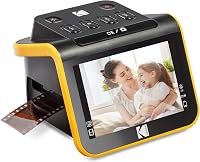
The Kodak Slide N Scan is a 22MP film and slide scanner with a 5-inch screen, built for 135, 110 and 126 film and 50mm slides. It suits a small batch of slides and negatives at home, but it does not scan prints and it needs its own memory card for storage.
On this page (15 sections)
- The Kodak Slide N Scan in brief
- Is the Kodak Slide N Scan good for slides and negatives?
- Kodak Slide N Scan problems to check before you buy
- Is the Kodak Slide N Scan good for your family archive?
- Who the Slide N Scan suits
- Specs at a glance
- Film holders and the loading tray
- The 5-inch screen and gallery mode
- Scan quality and what to expect
- Scanning a box of slides, step by step
- Connection and setup
- Warranty and support
- How the Slide N Scan compares with a flatbed
- Who should skip the Slide N Scan
- Is the Kodak Slide N Scan right for you?
The Kodak Slide N Scan is a 22MP film and slide scanner with a 5-inch screen, built for 135, 110 and 126 film and 50mm slides. It suits a small batch of slides and negatives at home, and it can show each frame on its own screen before you save it.
It is not a print scanner. It also needs its own SD card for storage, and that card is not in the box.
We compared its specs, holders and connection options with the other film and slide scanners on this site. Here is what it does well, what to check and who should choose a different machine.
The Kodak Slide N Scan in brief
KODAK SLIDE N SCAN Film and Slide Scanner
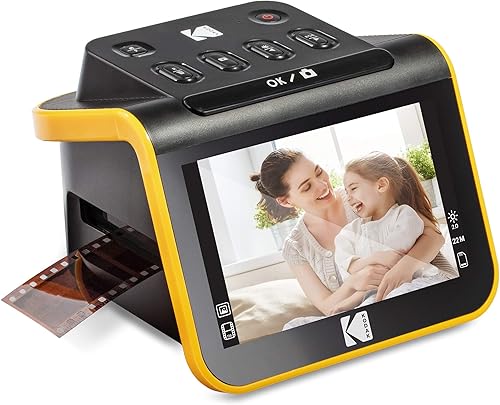
- 22MP output
- 5-inch LCD with gallery mode
- Film and slide holders for 135, 110 and 126 film
- Single-touch Scan button
A compact film and slide scanner with a large screen for checking each frame before you save it.
Pros
- Large 5-inch screen to preview each frame
- Single-touch Scan button
- Holders for 135, 110 and 126 film, plus 50mm slides
- Connects to a computer over USB-C
Cons
- Does not scan prints
- Memory card is not included
- Windows 7 is the stated minimum system
Is the Kodak Slide N Scan good for slides and negatives?
Yes, for a small batch. Its 22MP output and easy-load tray make it a simple choice for slides and negatives you want to view and share, and the single-touch Scan button keeps the routine short.
It is less suited to a large archive. Each frame goes through the tray by hand, so a box of several hundred slides will take many sessions.
If you want a flatbed that also handles film, our guide to scanning negatives with a flatbed scanner explains the trade-offs.
Kodak Slide N Scan problems to check before you buy
The first issue is the memory card. Kodak says you must have an SD or SDHC card, up to 32GB, to operate the scanner, and the card is not included.
The second is the formats, since the holders cover 135, 110 and 126 film plus 50mm slides. Medium-format film and other sizes are outside what this scanner handles.
The third is the print limit. The Slide N Scan is a film and slide scanner, not a flatbed, so a stack of paper prints needs a different machine.
The fourth is the system. Kodak lists Windows 7 as the minimum system requirement, so check that your computer can run the current software before you buy.
The fifth is the workflow. Each strip or slide goes through the tray by hand, so the scanner works best for a steady routine rather than a single rush job.
Is the Kodak Slide N Scan good for your family archive?
It is a good fit for a family archive that mixes a few slides and negatives. The screen lets you check the picture, and the gallery mode turns the scanner into a small photo frame.
It is less suited to a large family project with thousands of frames. For that job, a faster film scanner will save more time, so compare the batch size before you commit.
It also works well as a first step for someone who has never scanned film. The single-touch button and the LCD make the early sessions easier to learn.
Who the Slide N Scan suits
The Slide N Scan suits a family with a few boxes of slides from the same era, or a stack of negatives from one holiday. It is a good first film scanner for someone who wants to see each frame on screen right away.
It is a weaker fit for a mixed collection of prints and film. Keep the prints on a flatbed and use the Slide N Scan for the film, so each job uses the tool built for it.
Specs at a glance
The Slide N Scan is a compact film and slide scanner. The main numbers are below.
| Spec | Kodak Slide N Scan |
|---|---|
| Output | 22MP |
| Screen | 5-inch LCD |
| Formats | 135, 110 and 126 film, 50mm slides |
| Storage | SD or SDHC card up to 32GB, not included |
| Connection | USB-C to a computer, HDMI output |
| Size (W x D x H) | 5.3 x 5.4 x 3.7 in |
| Weight | 16 oz |
Our score weighs specs, features and buyer feedback against what you're shopping for.
Film holders and the loading tray
Kodak Slide N Scan film holders
The scanner includes a 50mm slide holder, plus adapters for 135, 110 and 126 film. Check the holder for each format before you start a batch.
The easy-load tray lets you feed a strip after another without a long setup. That keeps the rhythm steady when you work through a box of slides.
Before loading, wipe each slide or strip with a dry, soft cloth. Dust on a slide shows up on the screen and in the file, so a short clean saves a rescan later.
The 5-inch screen and gallery mode
The 5-inch LCD gives a clear preview of each frame before you save it. That matters with slides, since a slight misfocus or a dusty frame is easy to miss on a small view.
Gallery mode lets you page through the scans on the screen, which is handy when family members want to see the results right away. The scanner can also sit on a desk as a photo frame.
Use the preview to check exposure and sharpness. A frame that looks off on the screen is often worth a second pass.
Scan quality and what to expect
Kodak rates the output at 22MP, which gives a file large enough for prints of a reasonable size. Megapixel counts on scanners like this can include interpolation, so judge the result from one of your own slides.
Store the originals and the scanned files in separate places, so a failed card does not take both with it. Copy the files off the card after each batch, since the card works as a temporary store, not an archive.
Software matters too. The Scan button runs the capture software, which enhances, resizes and converts the photo, so keep an unedited copy of each image before you adjust it.
For very old or faded film, expect to adjust the color after the scan. A scanner captures what is on the film, including fading, so the file is only as good as the original.
Scanning a box of slides, step by step
Clean each slide with a dry, soft cloth before you load it. Choose the holder for the right film size, place the frame in the tray and press the Scan button.
Check the preview on the 5-inch screen, then move to the next frame. Once the batch is done, copy the saved files from the card to a folder on your computer.
Connection and setup
The Slide N Scan connects to a computer over USB-C, and it also offers an HDMI output for viewing on a television. That gives you two ways to look at the results.
Check that your computer has a USB-C port or an adapter before you buy. A missing port is a common surprise on a new purchase.
Set up the software and the memory card before the first session. Then scan a test slide and check the result at full size.
Warranty and support
Check the warranty terms for the Slide N Scan before you buy, since coverage can vary by seller and region. Keep the receipt and the model number together, so a claim is simple.
How the Slide N Scan compares with a flatbed
Only a flatbed with a transparency unit can scan negatives and slides, and it needs a holder and careful setup for each frame. The Slide N Scan is built for film, so the loading and the preview are simpler.
A flatbed also scans prints, which the Slide N Scan cannot do. If you have both prints and film, plan on two scanners, since most print flatbeds can't scan film.
For that comparison, read can you scan slides with a flatbed scanner. It explains what a flatbed can and cannot do with slides.
Who should skip the Slide N Scan
Skip it if your collection is mostly prints. The Slide N Scan does not handle them, and a flatbed is the better buy.
Skip it if you have a large archive of slides or negatives. A higher-capacity film scanner will save time over a long project.
Skip it if you use a film format outside 135, 110 and 126 or 50mm slides. Check your formats before you order.
Is the Kodak Slide N Scan right for you?
Pick the Kodak Slide N Scan if you have a small batch of slides or negatives, want a screen to check each frame, and need a simple machine for a steady home routine. It is an easy first film scanner.
Pick something else if your collection is mostly prints or your film is outside the supported formats. For more film and slide choices, see the best slide scanner for home use and the best film and negative scanners for home.
For how a film scanner fits with print and document scanners, see our photo scanner buying guide.
Frequently asked questions
Does the Kodak Slide N Scan work with slides and negatives?
It is built for 135, 110 and 126 film and 50mm slides, with adapters and a loading tray. It does not scan paper prints, so a flatbed is still the tool for those.
Does the Kodak Slide N Scan come with a memory card?
It supports SD and SDHC cards up to 32GB, but the card is not included. Buy one before you start, since the scanner needs somewhere to save images.
Is the Kodak Slide N Scan good for a big archive?
It suits a small to medium batch at home. For a large collection of slides, a dedicated slide feeder or a higher-capacity scanner will save time, so check the batch size before you start.
Can the Kodak Slide N Scan connect to a computer?
It connects to a computer over a USB-C port, and it also has an HDMI output for a television. Check that your computer has a USB-C port or an adapter before you buy.