Can You Scan Film Negatives With a Flatbed Scanner?
Usually not well, because a standard flatbed lights the surface of a negative instead of shining light through it. Only flatbeds with a transparency unit light the film from behind, so check your model first, or use a film scanner for negatives.
On this page (9 sections)
- Why a standard flatbed struggles with negatives
- When a flatbed can scan negatives
- Dedicated film scanners for negatives
- Which negatives suit which scanner
- Keep the flatbed for prints
- How to scan negatives well
- Signs a negative scan came out wrong
- Scanning a whole box of negatives
- The short answer on flatbeds and negatives
Can you scan negatives with a flatbed scanner? Usually not well, because a flatbed's lamp lights the surface of the glass, not the film itself.
Negatives need light passing through them, and a standard flatbed doesn't provide it. The result is a weak, flat picture unless your model has the right add-on.
This guide explains why the flatbed struggles, when it can do the job, and which film scanners suit negatives better.
Why a standard flatbed struggles with negatives
A standard flatbed reads light that bounces off paper. A negative is a thin film that needs light passing through it, so the usual flatbed light doesn't show its detail.
Color negatives also carry an orange base, and the tones are reversed. Without light passing through the film, the scanner captures only a small part of the image.
The result is usually a faint, low-contrast file that needs heavy editing. Test one negative before you scan a whole strip, so you know what you'll get.
When a flatbed can scan negatives
Some flatbeds have a transparency unit, a light in the lid or an add-on that shines through the negative. That is the step a standard flatbed skips, and a film holder then keeps each strip flat over it.
Holders are sold for particular models, so check the compatibility list before you buy. A holder made for one scanner may not fit another, even one from the same brand, and a holder can't add the missing light.
If your flatbed has no transparency unit, check the maker's notes on film support for your exact model. Many flatbeds for prints and papers don't support film at all.
Scan negatives with a flatbed when the parts are in place
Once the transparency unit or the holder is set up, load the strip so each frame sits flat and square. Set the resolution high enough for a small frame, and scan one strip before you run a roll.
Check the first scan on a big screen. If the frame looks right, keep the same setup for the rest of the roll.
Dedicated film scanners for negatives
A dedicated film scanner is the simpler route for negatives, because it's built for small frames. It has the light path, the holders and the settings for film, so you don't need to add parts to a flatbed.
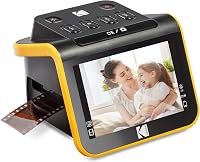
The Kodak Slide N Scan takes 135, 110 and 126 film, and it has a 5-inch screen to preview each frame. Kodak rates it at 22 megapixels.
The HP Film and Slide Scanner takes 135, 126 and 110 negatives through a quick-feed tray with a 50mm adapter. It has a 7-inch touch screen, so you can crop and adjust scans on the device.
Kodak's SCANZA converts 35mm, 126, 110, Super 8 and 8mm negatives and slides to JPEG files. It comes with film inserts and a film cleaning brush.
Which negatives suit which scanner
Check the film size first, since each scanner handles a set of frame sizes. Most family negatives are 35mm, but older cameras often used 120 medium-format film.
None of the three film scanners in this guide lists 120 medium-format film. If you have medium-format negatives, look for a scanner that lists that size by name.
Our best film scanner guide covers the wider range of film scanners. The Kodak Slide N Scan review looks at one of the most common choices in closer detail.
Keep the flatbed for prints
A flatbed does its best work on prints and papers, which lie flat under the lid. Film needs its own light path, so the two jobs usually suit two machines.
If you have both prints and negatives, a flatbed for the paper and a film scanner for the film is the simplest setup. You can keep the flatbed on a shelf and use the film scanner only when you need it.
How to scan negatives well
Dust on a negative shows up as a white or dark spot on every scan of that frame. Use a soft brush or a blower on the film, and handle it by the edges with clean hands or cotton gloves.
Scan at 2,400 dpi or more, since a negative frame is small. Our DPI guide for old photos explains the settings for film and prints.
Keep the negative flat in its holder while you scan. A curled strip can scan unevenly, so use a holder that keeps each frame still.
Signs a negative scan came out wrong
A faint, muddy image usually means the light isn't passing through the film. Check that your flatbed's transparency unit is on, or that the holder sits in the right slot.
Spots that repeat on every frame usually come from dust on the film. A curled strip can scan unevenly, so flatten it or use a holder that keeps it straight.
If a frame is still faint after both checks, rescan it at a higher setting before you give up on it.
Scanning a whole box of negatives
If you're scanning a whole box, sort the negatives by size and by roll before you start. A sorted box is easier to scan in order and easier to name later.
Work through one roll at a time. Check each strip on a big screen, and rescan any frame that comes out faint before you move on.
Keep the originals safe after scanning. A negative is the master copy of the image, so store the strips in an archival sleeve, out of sun and damp.
The short answer on flatbeds and negatives
Usually not well, unless your flatbed has a transparency unit and a film holder built for your model. For a box of negatives, a film scanner is the simpler route.
For the slide side of the question, read can you scan slides with a flatbed scanner. For a full project plan, the guide on how to digitize old photos covers prints, film and storage together.
For how film scanners fit with print scanners, see our photo scanner buying guide.
Frequently asked questions
Can you scan negatives on a regular flatbed?
Not well, in most cases, since a standard flatbed lights the surface and a negative comes out faint. A flatbed with a transparency unit and a film holder made for your model can do better.
What is the simplest way to scan negatives at home?
A dedicated film scanner is the simplest route. The Kodak Slide N Scan, HP Film and Slide Scanner and Kodak SCANZA all handle 35mm negatives, so check the frame sizes each one lists before you buy.
Do I need to clean negatives before scanning?
Yes, a quick clean helps, since dust shows up as spots on every scan of that frame. Brush it off with a soft brush or a blower, and handle the film by its edges.