Can You Scan Slides With a Flatbed Scanner?
Only some flatbeds can scan slides well, because a slide needs light passing through it. A standard flatbed lights only the glass, so for most slides a dedicated slide scanner gives sharper, more reliable results.
On this page (8 sections)
Can you scan slides with a flatbed scanner? Only with a transparency unit, which lights the slide from behind, because a slide shows its color only when light passes through it.
A standard flatbed is built to read light reflected from paper, so the answer depends on whether your model has the parts a slide needs. This guide explains what a flatbed needs for slides, what you get without those parts and when a dedicated slide scanner is the better choice.
What a flatbed needs to scan slides
A flatbed needs a light source behind the slide, and that is what a transparency unit provides. The unit lights the slide from below, the way a light table does, so the image comes through clearly.
Slide holders keep each slide flat and centered over that light. A holder only positions the slide, so it can't make up for a flatbed with no light in the lid.
Check the model's features before you buy anything. A flatbed without a transparency unit needs a different tool for slides, and a holder made for one model won't fit another.
What a standard flatbed gives you with a slide
A standard flatbed bounces its lamp off the slide, so the picture comes out dark and low in contrast. Reflections from the glass can also show up in the scan.
You can get something usable from a family slide, especially if it's a sharp, well-lit frame. For a box of slides, though, a dedicated scanner is the more reliable choice.
Expect extra editing on each scan. Contrast, brightness and color all need work when the light comes from above instead of from behind.
Dedicated slide scanners that handle slides well
A dedicated slide scanner has the light path, the holders and the screen built in. That is why it gives more consistent results on a box of slides than a flatbed without the right parts.
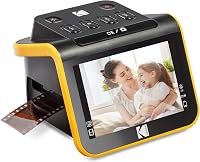
The Kodak Slide N Scan includes a 50mm slide holder and adapters for 135, 110 and 126 film. Its 5-inch screen lets you check each slide right after you scan it.
The HP Film and Slide Scanner uses a quick-feed tray with a 50mm adapter for 135, 126 and 110 slides. Its 7-inch touch screen lets you crop and adjust scans on the device, and HP gives it a 13-megapixel rating.
The Kodak SCANZA takes slides and negatives with several film inserts and adapters. It comes with a film cleaning brush, and its 3.5-inch screen is the smallest of the three.
Preparing slides for the scan
Dust on a slide shows as a bright or dark spot on the scan, and it's hard to remove later. Use a soft brush or a blower, and handle slides by their edges with clean hands.
Check that each slide sits square and flat in its holder. A slide that sits crooked scans crooked, and you'll have to straighten or crop each image afterward.
Look at each slide for mold, cracks or a lifting film layer before you scan it. Damaged slides can be harmed further in the scanner, so set them aside for a closer look.
Common mistakes when scanning slides
The most common mistake is scanning slides at too low a setting. A 35mm slide is small, so a low dpi produces a file too small to crop or enlarge.
Another is skipping the first test. Scan one slide, check it on a big screen, and adjust the setting before you run the box.
Many people also forget to clean the holder. A dusty holder can mark every slide that passes through it, so wipe it before each session.
Scan slides at 2,400 dpi or more
A 35mm slide is small, so a high setting gives you a file you can use. A common starting point is 2,400 dpi, and our DPI guide for old photos explains how the numbers add up.
Start with one slide, and check the result on a big screen before you run the box. Zoom in on the detail, and adjust the setting if the file looks soft.
Keep the originals in a sleeve after scanning. The slide is the master copy, so store it out of sun and damp.
When a flatbed is enough
Can you scan slides with a flatbed for a handful?
If you have a handful of slides and a flatbed with a transparency unit, the job is manageable. Set the scanner up once, scan the slides in one session and save the files.
For a large box, a dedicated slide scanner saves time. It is built for small frames, so each slide takes less setup, and the screen helps you catch problems early.
Our best slide scanner guide compares the choices in more detail. The Kodak Slide N Scan review covers one of the most common picks.
The short answer on slides and flatbeds
Yes, a flatbed can scan slides, but only with a transparency unit that lights the slide from behind, plus a holder to keep it flat. Without that light, you'll get a dim image that needs heavy editing.
For a box of slides, a dedicated slide scanner is the simpler route. It has the holders and light built in, and it lets you check each slide on its own screen.
If you also have negatives, read can you scan negatives on a flatbed scanner. The two jobs use the same light path, so much of the same advice applies to both.
For how film scanners fit with print scanners, see our photo scanner buying guide.
Frequently asked questions
Can you scan slides on a regular flatbed scanner?
You can get a rough copy, but the image is usually dim and washed out. A flatbed needs a transparency unit for good slide scans, plus a holder to keep each slide flat, so check your model's features before you try.
What is the easiest way to scan a box of slides?
A dedicated slide scanner is the easiest route. The Kodak Slide N Scan, HP Film and Slide Scanner and Kodak SCANZA each take slides with holders or inserts, and each has its own screen.
Why do slides look dark when scanned on a flatbed?
A standard flatbed shines light onto the top of the slide, and a slide shows its colors only when light passes through it. Light from above gives a dim, low-contrast image, which is why a light path matters.