5 Best Film and Negative Scanners for Home (October 2026)
The best film and negative scanners for home include the Plustek OpticFilm 8300i Ai Film Scanner for careful color on a computer, the KODAK Slide N Scan Film & Slide Scanner for mixed negatives and slides, and the KODAK SCANZA Film and Slide Scanner for Super 8 and 8mm film.
On this page (10 sections)
- The five best film and negative scanners for home, in detail
- Side by side: film scanners on film types, screen and connection
- Why negatives need more work than slides
- How we picked these five film scanners
- Computer or stand-alone: which film scanner fits your home
- Check the negatives before you scan a box
- Film scanner setup and a first batch of negatives
- Film scanner resolution and what the megapixels mean
- How to store negatives after you scan them
- Which film scanner for home negatives should you buy?
The best film scanner for home is the Plustek OpticFilm 8300i Ai if you want careful color on a computer, or the Kodak Slide N Scan if you want a screen on the scanner. We compared five models on film types, color control, whether a computer is needed and how the scans are stored.
The Plustek OpticFilm 8300i Ai leads the list for careful color work on a computer. The Kodak Slide N Scan is the easier pick if you want a screen on the scanner itself, and the other three fill in the rest of the range.
Our picks at a glance
-
1
 Best for careful color on a computer
Plustek OpticFilm 8300i Ai Film Scanner
8.3/10 our score
See it on Amazon -
2
 Best for mixed negatives and slides
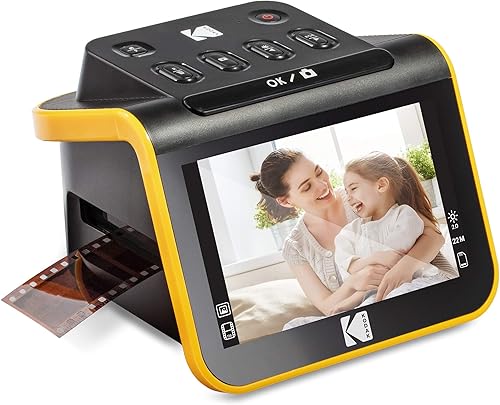
KODAK Slide N Scan Film & Slide Scanner
8.2/10 our score
See it on Amazon -
3

- 4
 Check it
Magnasonic All-in-One 24MP Film Scanner
Best for viewing on a TV - 5
 Best for a budget negative scannerCheck it
The five best film and negative scanners for home, in detail
The OpticFilm 8300i scores highest because its software and calibration target give you the most control over color. The Kodak models come next, since they handle the most common film sizes with a screen on the unit.
Plustek OpticFilm 8300i Ai Film Scanner
- Scans 35mm slides and film
- SilverFast 9 software bundled, per Plustek
- IT8 calibration target bundled, per Plustek
- 16-bit color, USB connection
A film scanner that runs from a computer, with color software and a calibration target in the box. It's the choice for careful color work, and it costs more than the others here.
Pros
- Calibration target and color software for careful work
- Plustek says scan speed is up 38% on the last model
- Works with Windows and Mac, per Plustek
Cons
- Needs a computer, so it's not a stand-alone scanner
- No batch scanning, per Plustek
- Costs more than the other picks here
Plustek's OpticFilm 8300i Ai is a film scanner that runs from a computer, and it scans 35mm slides and film. It's built for careful work, with a sensor and software that aim for accurate color.
Plustek bundles SilverFast 9 software with the scanner, and it includes an IT8 calibration target. The target is a set of known color patches, so the software can match the scan to the target.
Plustek says the new chip raises scan speed by 38 percent over its last model. It also says the scanner works with Windows and Mac, which you can check against your own system.
The scanner needs a computer, so it's not a stand-alone unit, and Plustek says it can't batch scan. It costs more than the other picks here, so it's the choice for someone who wants control over the color.
KODAK Slide N Scan Film & Slide Scanner
- 22MP output for 135, 110 and 126 negatives and slides
- 5-inch LCD with a gallery mode
- Quick-feed tray for continuous loading
- Needs an SD card up to 32GB (sold separately), and also connects to a computer over USB-C
A small film and slide scanner with a 5-inch screen, so you can preview each negative before you scan it. It suits a box that mixes negatives and slides.
Pros
- Handles negatives and slides in one tray
- Screen on the scanner for checking frames
- Small enough for a shelf
Cons
- SD card sold separately
- The 5-inch screen is smaller than the Slide N Scan Max's
The Slide N Scan takes both negatives and slides in one tray. It supports 135, 110 and 126 film, and a 50mm slide holder comes in the box.
The 5-inch LCD shows each frame before you scan it, which helps with a mixed box.
Kodak says you must have an SD card (up to 32GB) to operate it, and the card isn't in the box. It also connects to a computer over USB-C, weighs 16 ounces and fits on a shelf.
The screen is smaller than the Slide N Scan Max's, and that's the main trade-off in this group. The Max has a 7-inch display if you want a bigger view.
KODAK SCANZA Film and Slide Scanner
- Converts 35mm, 126, 110, Super 8 and 8mm negatives and slides
- 3.5-inch tilting LCD
- Film inserts and adapters for several formats
- Film cleaning brush included
The widest film range here, with Super 8 and 8mm alongside 35mm, 126 and 110. Kodak says it won't convert film formats outside that list.
Pros
- Covers Super 8 and 8mm as well as 35mm
- Film inserts and adapters in the box
- HDMI and USB output
Cons
- Smaller 3.5-inch screen
- The SD card is sold separately
The Scanza covers the widest film range in this group. It handles 35mm, 126, 110, Super 8 and 8mm negatives and slides, which matters for an older family box.
Its 3.5-inch LCD tilts, so you can angle it for a comfortable view. The unit comes with film inserts and adapters, and a film cleaning brush.
Kodak says the scanner takes up to 128GB of SD card, which is sold separately. It connects over HDMI or USB, and the cables are in the box.
Kodak notes that the Scanza won't convert film formats outside its list, so check the box before you buy.
Magnasonic All-in-One 24MP Film Scanner
- 16MP scans, or 24MP by interpolation, from 35mm, 110, 126 and Super 8 negatives and 135, 126 and 110 slides
- 5-inch LCD
- HDMI output, with the cable sold separately
- SD card slot up to 128GB
A stand-alone film scanner that saves to an SD card and shows scans on its own screen or a TV. Magnasonic says no computer or driver is needed.
Pros
- No computer or driver needed, per Magnasonic
- Shows scans on a TV over HDMI
- SD card slot up to 128GB
Cons
- HDMI cable is sold separately
- Basic color adjustments on the unit, with no calibration target
The Magnasonic FS71 is a stand-alone film scanner that Magnasonic says needs no computer or driver. It converts 35mm, 110, 126 and Super 8 negatives, and 135, 126 and 110 slides.
It outputs 16MP files, or 24MP by interpolation, and saves them to an SD card with a slot for up to 128GB. The 5-inch LCD shows the scan, and HDMI lets you view scans on a TV.
The HDMI cable isn't in the box, so buy one if you want the TV view. The unit weighs 13.44 ounces.
It adjusts brightness, color and orientation on the unit, which covers basic edits. It's the pick for someone who wants to view and save scans without a computer.
PORTTA Film Scanner NS10
- Converts 135, 126 and 110 film, plus Super 8 for photos
- 16MP or 22MP output
- 5-inch LCD for preview and alignment
- SD card up to 128GB and HDMI output
A small film scanner with a 5-inch screen and built-in image adjustments. It has a two-year warranty from the maker, which makes it a fair buy for a first film scanner.
Pros
- Built-in brightness, color and orientation tools
- Two-year warranty from the maker
- Lightweight at 407 g
Cons
- Narrower film range than the Scanza
- Super 8 is for photos only
The PORTTA NS10 is a small film scanner with a 5-inch LCD and built-in adjustment tools. It converts 135, 126 and 110 film, and Super 8 for photos.
It outputs 16MP or 22MP files, and it saves to an SD card up to 128GB. HDMI output gives you a TV view, and the unit weighs 407 grams.
The maker gives a two-year warranty, which is a useful safety net for a first scanner. The 5-inch screen lets you adjust brightness, color and orientation before you save.
Its film range is narrower than the Scanza's, so it's the budget pick for negatives and slides in the common sizes.
Side by side: film scanners on film types, screen and connection
The Scanza covers the widest film range, while the OpticFilm 8300i Ai is the only computer-driven scanner here. The Kodak models and the Magnasonic and PORTTA each give a screen on the unit.
| Product | Best for | Film types | Connection | Screen | Our score |
|---|---|---|---|---|---|
| Plustek OpticFilm 8300i Ai Film Scanner | careful color on a computer | 35mm film strips and slides | USB, needs a computer | None, runs from a computer | 8.3 |
| KODAK Slide N Scan Film & Slide Scanner | mixed negatives and slides | 135, 110 and 126 film, 50mm slides | USB-C and HDMI | 5 in LCD | 8.2 |
| KODAK SCANZA Film and Slide Scanner | Super 8 and 8mm film | 35mm, 126, 110, Super 8, 8mm | HDMI and USB | 3.5 in TFT LCD | 7.7 |
| Magnasonic All-in-One 24MP Film Scanner | viewing on a TV | 35mm, 110, 126, Super 8 film; 135, 126, 110 slides | HDMI and USB | 5 in LCD | 6.9 |
| PORTTA Film Scanner NS10 | a budget negative scanner | 135, 126, 110 film and slides, Super 8 for photos | USB and HDMI | 5 in LCD | 6.8 |
Film types decide most of the fit. The Scanza is the only one that lists 8mm, the Magnasonic and PORTTA add Super 8 stills, and the OpticFilm takes 35mm only.
Connection is the next check. The OpticFilm needs a computer over USB, and the others save to an SD card or show scans on a screen.
Why negatives need more work than slides
A negative is an inverted image, with a color cast from the film base. A scanner or its software has to flip the tones and correct the cast before the photo looks right.
A slide is already a positive image, so it skips the flip. Most of the film scanners here handle both, but check the software's color options before you start a negative batch.
Best film scanner for color negatives at home
Color negatives need the most care, because the cast and the tones both matter. The OpticFilm 8300i Ai suits that work, since its calibration target lets the software match the color to a known reference.
For a quicker run with a screen on the unit, the Slide N Scan and Scanza give you a preview of each frame. Our best slide scanner guide compares the slide-first models in more depth.
How we picked these five film scanners
We compared the film types, screen size, storage, connection and software each maker gives. Our score weighs specs, features and buyer feedback against what you're shopping for.
Each scanner faced the same questions:
- Which negative and slide sizes does it handle?
- Does it need a computer, or does it save to a card?
- How does it handle color, including a calibration target?
- What's the screen size for checking each frame?
- What comes in the box, and what do you have to buy?
Here's how the scores landed:
- OpticFilm 8300i Ai, 8.3: the most color control, with a calibration target and software, but it needs a computer.
- Slide N Scan, 8.2: negatives and slides in one tray, with a screen on the unit.
- Scanza, 7.7: the widest film range, including Super 8 and 8mm.
- Magnasonic FS71, 6.9: stand-alone saving and TV viewing, with simpler editing.
- PORTTA NS10, 6.8: a small scanner with a two-year warranty and built-in adjustments.
Computer or stand-alone: which film scanner fits your home
A computer-based scanner gives you the most color control. The OpticFilm 8300i Ai fits someone who will spend time on each frame, and who likes software that matches the color to a target.
A stand-alone scanner suits a family member who wants to view and save scans without a computer. The Kodak models, the Magnasonic and the PORTTA all save to an SD card or a screen.
If your box also holds prints, the FastFoto negatives answer explains why a print scanner can't read film. The best photo scanner for old family photos covers the print side of the same box.
If you're not sure, start with a stand-alone scanner. You can always scan the most important frames on a computer later, and our guide to the best slide scanner covers the slide-first models.
Check the negatives before you scan a box
Look at each strip for curl, stuck frames and dust, and sort the strips by film size before you load them. A curled strip loads better when you let it relax flat between sheets, rather than forcing it into the holder.
Wear clean cotton gloves or hold each strip by its edges, so oil from your fingers doesn't mark the film. Keep damaged strips apart, and scan them last, since a bent strip may not sit right in a tray.
Film scanner setup and a first batch of negatives
Place the scanner on a flat, steady surface, and connect it to the computer or the power as the manual directs. Insert the holder for your negatives before you switch on.
Run three or four frames first, and check each one at full size. If the color looks heavy or the frames sit crooked, adjust the settings before the rest of the batch.
Keep each negative strip in a sleeve, and label the sleeves by date or subject. That saves time when a batch needs a rescan.
Film scanner resolution and what the megapixels mean
Each maker gives a megapixel figure for its scans. The Kodak Slide N Scan and Scanza quote 22MP, the Magnasonic quotes 24MP from a 16MP sensor, and the PORTTA offers 16MP or 22MP, so the numbers look close at first.
Megapixels describe the size of the file, not the detail in the film, and several of these figures include interpolation. Grain, focus and the scanner's optics set the real detail, so a bigger number doesn't guarantee a better scan.
For family negatives, a file of about 20MP is large enough for a standard print, and it saves room on the drive. Check a few frames at full size before you commit to the highest setting for a whole box.
How to store negatives after you scan them
Keep negatives in archival sleeves, away from heat, humidity and direct light. A cool, dry drawer or box keeps the film in better shape than a shelf in a sunny room.
Back up the scans to a second drive, and keep a copy somewhere other than the main computer. The scan is a copy, and the negative is the original, so keep both.
Our guide to scanning negatives on a flatbed explains the flatbed route for a few strips.
Which film scanner for home negatives should you buy?
Buy the Plustek OpticFilm 8300i Ai if you want color control and you have a computer to run it. Buy the Kodak Slide N Scan if you want a screen on the unit and both negatives and slides in one tray.
Buy the Scanza if your box includes Super 8 or 8mm film. The Magnasonic and PORTTA suit a stand-alone scanner on a tighter budget, with the PORTTA's warranty as a safety net.
If your box is mostly slides, the best slide scanner list is the next stop before you decide.
Before you order, match your box to the film sizes each model handles. If you can, pick one scanner that covers the whole box, so the batch stays consistent.
For how film scanners fit with print scanners and document scanners, see our photo scanner buying guide.
Our top 3 picks at a glance
-
1
Best for careful color on a computer
Plustek OpticFilm 8300i Ai Film Scanner
8.3/10 our score
See it on Amazon -
2
Best for mixed negatives and slides
KODAK Slide N Scan Film & Slide Scanner
8.2/10 our score
See it on Amazon -
3
Frequently asked questions
What is the best film scanner for home?
The Plustek OpticFilm 8300i Ai is the best pick for careful color work on a computer, since it comes with color software and a calibration target. For a scanner with its own screen and no computer, the Kodak Slide N Scan is the better match.
Can a film scanner handle both negatives and slides?
Most of these models take both, including the Kodak Slide N Scan and the Scanza. Check the list of film types before you order, since a model may cover slides and not negatives in every size.
Do I need a computer for a film scanner?
Some do not, including the Magnasonic and the PORTTA, which save to an SD card and show scans on a screen. The Plustek OpticFilm 8300i Ai is built to connect to a computer.
What is a calibration target for a film scanner?
A calibration target is a film strip with known color patches, and software uses it to match the scanner's color to the target. Plustek includes an IT8 target with the 8300i Ai, so you can check color against it.
How do I store negatives after I scan them?
Keep negatives in archival sleeves, away from heat, humidity and direct light. Back up the scans to a second drive, since the scan is a copy and the negative is the original.