Does the Epson FastFoto Scan Negatives or Slides?
No, the Epson FastFoto FF-680W is built for prints, Polaroids, panoramas and documents, not negatives or slides. For film, you need a scanner with a film holder, such as the Kodak Slide N Scan or a Plustek film scanner.
On this page (7 sections)
No, the Epson FastFoto FF-680W doesn't scan negatives or slides. It's built for prints, Polaroid-size photos, panoramas, postcards and documents, so film needs a different scanner.
That answers the question, but it leaves a common worry. Many family boxes hold both prints and negatives, so it helps to know what the FastFoto does well and where a film scanner takes over.
What the FastFoto is built to scan
The FastFoto is a photo and document scanner, and Epson says it handles prints up to 8 x 10 inches. It also takes Polaroid photos, panoramas and postcards, which covers most of a family's paper photos.
The scanner feeds prints through rollers. For delicate prints, Epson includes a carrier sheet in the box.
The FastFoto also reads documents, so it fits a family box that mixes photos with letters and cards. Its duplex pass captures both sides of a print in one scan.
Why the Epson FastFoto can't scan negatives
A negative or a slide is a film image, and it's read with light passing through the film. A print is read with light bouncing off its surface, which is the method the FastFoto uses.
The FastFoto's box contains a carrier sheet, a cleaning cloth and a power adapter. It doesn't include a film holder, and nothing in the FastFoto's features describes film scanning.
Some flatbeds have a transparency unit, a light that shines through the film. The FastFoto has no such light path, so it can't stand in for one.
Check a scanner's film list before you buy
A film scanner lists the film sizes it reads, and that list matters more than the brand. A model that reads 35mm and 126 film may skip Super 8, for example, so match the list to the box.
Look at the box before you order. Note whether the strips are 35mm, medium format or a mix, and whether the slides sit in cardboard mounts or plastic frames.
Check the connection too. Some film scanners save to an SD card, and others need a computer over USB, so decide how you want to work before you buy.
How long a film batch takes
A film batch goes slower than a print batch, since each frame needs its own check. Plan for a steady session rather than a quick pass, and keep the batches small.
Label each strip before you scan, so a long session doesn't mix up the frames. A small batch is easier to check, and a rescan is simpler when you know which strip it came from.
Which scanner handles negatives and slides
A dedicated film scanner has a holder for negatives or slides, and it's built to read the film. Three options from this site's list show the range.
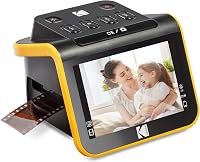
The Kodak Slide N Scan takes negatives and slides in one tray, with a 5-inch screen for checking each frame. Kodak says you must have an SD card to operate it, and the card is sold separately; it also connects to a computer over USB-C.
The Plustek OpticFilm 8300i Ai is a computer-based film scanner with color software and a calibration target. It's the choice for someone who wants to control the color closely, and it costs more than the others here.
The PORTTA NS10 is a small film scanner with a 5-inch LCD and built-in adjustments. It converts 135, 126 and 110 film, and it saves to an SD card and shows scans on a TV over HDMI.
Our best film scanner list compares these and two more models, and the best slide scanner list covers the slide-first choices.
Can a flatbed scan negatives instead?
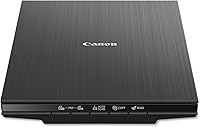
Only a flatbed with a transparency unit can scan film, and most flatbeds for prints don't have one. A flatbed that can't read film won't help with a box of negatives, so check the specs before you buy.
Our guide to scanning negatives with a flatbed explains which setups work and where they fall short. It's worth reading before you rely on a flatbed for film.
What to do with a box that has prints and negatives
Sort the box into two piles, one for prints and one for negatives and slides. Scan the prints on the FastFoto or a flatbed, and the film on a film scanner.
Keep the negatives in archival sleeves, out of heat and humidity, until you scan them. Label each strip by date or subject, so the scans can be matched back to the originals.
Back up the scans to a second drive once a batch is done. A scan is a copy, and the negative is the original, so keep both.
Does the Epson FastFoto scan negatives? The short answer
The FastFoto doesn't scan negatives or slides, so plan a film scanner for that part of the box. Use the FastFoto for the prints, where its speed and duplex pass do the most good.
Our best photo scanner for old family photos roundup covers the FastFoto alongside the flatbeds, and the guide to choosing a photo scanner explains the trade-offs.
For every scanner type in one place, see our photo scanner buying guide.
Frequently asked questions
Can the FastFoto scan a film negative?
The FastFoto is built for prints, Polaroids, panoramas, postcards and documents, and its box has a carrier sheet rather than a film holder, so use a film scanner for negatives.
Can the FastFoto scan a slide?
No, the FastFoto is not a slide scanner. A slide is a transparency that needs light passing through it, which the FastFoto's print-scanning setup doesn't provide.
What scanner should I buy for both prints and negatives?
Buy a flatbed or a FastFoto for the prints, and a film scanner for the negatives. A mixed family box usually needs both, so plan the work in two passes.
How do I know if a scanner handles negatives?
Look for a film holder, a list of film sizes and a slide or negative setting in the software. If the maker doesn't name negatives or slides, assume it can't scan them.