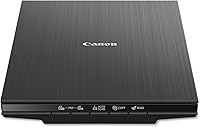
How to Clean a Flatbed Scanner Glass
To clean a flatbed scanner glass, unplug the scanner, wipe the glass with a soft microfiber cloth dampened with a little cleaner, then dry it before you scan. Spray the cloth, never the glass, and check the maker's manual for the cleaner it allows.
On this page (8 sections)
- What you need to clean a flatbed scanner glass
- Step by step: cleaning the glass
- Which cleaner is safe for a scanner glass
- Clean the lid and the backing strip too
- How often to clean a flatbed scanner glass
- Mistakes to avoid when cleaning scanner glass
- Cleaning feed rollers in a sheet-fed scanner
- How to clean a flatbed scanner glass before your next batch
To clean a flatbed scanner glass, unplug the scanner, wipe the glass with a soft microfiber cloth lightly dampened with a little cleaner, and dry it before you scan. Spray the cloth rather than the glass, and check the manual for the cleaner your model allows.
A speck on the glass shows up as a line or a dot in every scan. A clean glass takes a few minutes, and it saves a lot of editing later.
What you need to clean a flatbed scanner glass
You need a soft microfiber cloth, a little cleaner and a dry cloth for the final wipe. Use a lint-free cloth, since paper towels can leave fibers on the glass.
A few cloths in a pack make the job easy to repeat. Keep one cloth for the glass only, so dust from the desk doesn't go back onto it.
Step by step: cleaning the glass
Follow these steps each time you clean the glass, in this order. Read the cleaning note in your manual first, since some models have specific steps for the glass and lid.
- Unplug the scanner and wait a moment, so the unit is off before you start.
- Lift the lid and look at the glass in good light, so you can see the specks you need to remove.
- Spray a little cleaner onto the microfiber cloth, not onto the glass.
- Wipe the glass in one direction, using light pressure, and turn the cloth to a clean side as you go.
- Dry the glass with a second dry cloth, so no streaks are left behind.
- Check the white backing strip on the lid, which can hold specks that show up in every scan.
- Plug the scanner back in, and run a trial scan before you start the batch.
How to clean a flatbed scanner glass without leaving marks
Keep liquid away from the vents, the cable ports and the edges of the scanner. A little moisture on the cloth goes a long way, and too much liquid can run into the body.
Use a light touch on the glass, and avoid pressing hard on dried dust. Scrubbing can scratch the glass, so lift the dust with a dry cloth first.
Which cleaner is safe for a scanner glass
Start with a damp microfiber cloth and a little plain water. For most dust and light marks, that's enough, and it leaves nothing behind.
If a cleaner is needed, check the maker's manual for the one it allows. Some glass cleaners leave a film that shows up in scans, so a clean, dry cloth is the final step either way.
Spray the cloth in a separate spot, then wipe. Keep the bottle away from the scanner's cable and lid hinge.
Clean the lid and the backing strip too
The white strip on the underside of the lid is part of the scan. Dust on it can show as a line in every image, even when the glass looks clean.
Wipe the strip with the same dry cloth, and use a damp cloth only where the dust sticks. Let it dry completely before you close the lid.
Brush the lid's edge with the dry cloth too, since loose dust there can drop onto the glass when you close the lid.
Our best flatbed scanners for photos roundup covers the models that use this glass and lid layout.
How often to clean a flatbed scanner glass
Clean the glass before each big batch, since a single dusty print can mark a whole session. A quick wipe between sessions keeps specks from building up.
Clean it sooner after you handle a dusty or greasy print, such as an old envelope or an album page. Fingerprints on the glass are the most common cause of soft marks in a scan.
Mistakes to avoid when cleaning scanner glass
Don't spray cleaner directly onto the glass. The liquid can run under the edges and reach the electronics.
Don't use paper towels or a rough cloth, since both can leave fibers or scratches. Don't use harsh solvents unless the manual allows them.
Don't press on the glass with your fingers after cleaning. Hold the print by its edges and set it down gently.
Cleaning feed rollers in a sheet-fed scanner
A sheet-fed scanner needs a different kind of cleaning. Its feed rollers can pick up dust and paper residue, and a feed-roller wipe is made for that job.
The Fujitsu wipe is made for the pick roller in the ScanSnap S300, not for a flatbed's glass. Use the flatbed steps for glass, and the roller wipe for feed rollers only.
Our guide to choosing a document scanner for home papers covers the sheet-fed side in more detail.
How to clean a flatbed scanner glass before your next batch
Unplug, dampen the cloth, wipe, dry and check the lid. Then run a trial scan on a few prints, so you know the glass is clear before the full pile goes through.
If the trial shows a line or a spot, clean the glass again. A second pass usually clears the mark, and the trial scan proves it.
For the wider picture on prints, the best scanner for old photos guide walks through settings, speed and software. Our photo scanner buying guide lists the full range of scanners.
Frequently asked questions
How often should I clean a flatbed scanner glass?
Clean the glass before each big batch, and any time a dusty or greasy print has been on it. A quick wipe with a dry cloth between sessions keeps specks from building up.
Can I use window cleaner on a scanner glass?
Check the maker's manual first, since some cleaners leave a film. A barely damp microfiber cloth with a little plain water is the safest first step for most glass.
Why does a scan show a line or a dark spot?
Dust, a fingerprint or a film residue on the glass shows up as a line or spot in every scan. Clean the glass and the white backing on the lid, then run a trial scan to confirm.
Do I clean the feed rollers the same way?
No. Feed rollers need a feed-roller wipe, such as the Fujitsu wipe made for the ScanSnap S300, while flatbed glass needs a soft cloth.