5 Best Photo Scanners: Flatbed, Feed-Through and Slide (October 2026)
The best photo scanners for old prints include the Epson FastFoto FF-680W for a big batch of family prints, the Epson Perfection V39 II for albums and thick prints, and the Kodak Slide N Scan for slides and negatives.
On this page (10 sections)
- Flatbed, feed-through or slide: which type you need
- How we picked these five
- The five picks in detail
- When a flatbed beats a feed-through scanner
- Slides and negatives need their own tool
- Which scanner for which box
- Plan your time with a big box
- Resolution and file settings for old prints
- Software and organizing your scans
- Final pick: the best photo scanner for your box of prints
The best photo scanner is the Epson FastFoto FF-680W for a big batch of prints, a flatbed like the Epson V39 II for albums, and the Kodak Slide N Scan for film.
The right one depends on what's in your box. Flatbeds lay each print flat on glass, feed-through scanners pull prints through rollers, and slide scanners light film from behind.
We compared the specs and features of the photo scanners that came up for this search. The five picks below cover a feed-through scanner for big batches, a flatbed with a raised lid, a slide and negative scanner, a one-cable flatbed and a quick photo feeder.
Our picks at a glance
-
1

-
2
-
3
Flatbed, feed-through or slide: which type you need
A flatbed suits a few prints at a time, and it's the gentlest choice for albums, thick photos and fragile corners. It takes longer per print, but each one stays flat under the lid.
A feed-through scanner suits a large pile of sturdy prints. It moves each print through rollers, so it's fast, but curled or cracked prints can jam or get harmed in the feed path.
A slide scanner is a separate tool for film. Slides and negatives need light shining through them, which a standard flatbed doesn't provide, so a slide scanner has the light and holders that film needs.
If your box holds all three kinds, you'll likely need two scanners. A feed-through or flatbed handles the prints, and a slide scanner handles the film.
How we picked these five
Our score weighs specs, features and buyer feedback against what you're shopping for. For a photo scanner, we gave the most weight to the type of scanning, the sizes and formats each one takes, the resolution the maker gives and how well it handles old prints.
We kept one scanner for each type we wanted to cover, then added the strongest alternative in each group. Speed and resolution figures come from each maker, so we label them that way.
Resolution is a starting point, not a promise of quality. The settings you pick at scan time matter as much as the number on the box, and our guide on DPI for old photos explains which setting suits which print.
Best photo scanner for prints, slides and albums
If you have mostly prints, start with the feed-through and flatbed picks. If the box holds slides or negatives, the Kodak Slide N Scan is the one to check first.
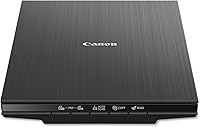
Albums and thick photos need a flatbed with a lid that lifts. For a few prints a week, a one-cable flatbed like the LiDE 400 fits the routine.
| Product | Best for | Type | Connection | Resolution | Our score |
|---|---|---|---|---|---|
| Epson FastFoto FF-680W | a big batch of family prints | Feed-through photo scanner | Wi-Fi and USB | 300, 600 or 1,200 dpi (Epson's settings) | 8.7 |
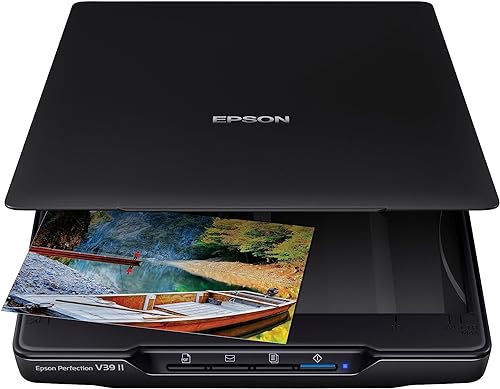
| Epson Perfection V39 II | albums and thick prints | Flatbed with a raised lid | USB | 4800 dpi optical (Epson's figure) | 8.4 |
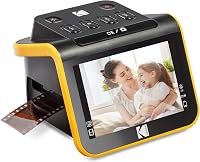
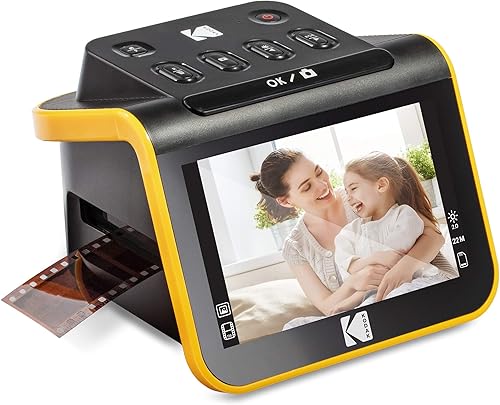
| Kodak Slide N Scan | slides and negatives | Film and slide scanner with screen | USB-C and HDMI | 22 megapixels (Kodak's figure) | 8.2 |
| Canon CanoScan LiDE 400 | a one-cable desk | Flatbed | USB Type-C | 4800 x 4800 dpi (Canon's figure) | 8.2 |
| Plustek ePhoto Z300 | a quick run of 4x6 prints | Feed-in photo scanner | USB | 600 dpi optical (Plustek's figure) | 7.3 |
The five picks in detail
Epson FastFoto FF-680W
- Feed-through scanning, about one photo per second
- Two-sided scanning in one pass
- Wi-Fi connection and a companion app
A feed-through scanner for a large pile of family prints, with the front and back captured in one scan.
Pros
- Fast batch scanning
- Captures handwriting on the back of a print
- Wi-Fi and an app for notes and slideshows
Cons
- A premium pick, best for a big job
- Fragile or curled prints need care in the feed path
The FastFoto FF-680W is the top pick for a big batch of family prints. Epson says it scans about one photo per second at 300 dpi, and it handles Polaroids, panoramas and postcards alongside standard sizes.
Its single-step technology captures the front of a print and any handwriting on the back in one scan. The Epson FastFoto app adds voice and text notes, and it builds slideshows from your scans.
For a family project, that means the stories stay with the picture. It is a premium pick, so it suits a job with many prints.
The feed path also means fragile prints need care, so try a few first. Our guide on best scanners for photos and documents covers mixed piles in more detail.
Epson Perfection V39 II
- High-rise removable lid
- Easy Photo Fix color restore
- Stitches oversized images together
A flatbed whose lid lifts for albums and bound pages, with a one-click color fix for faded prints.
Pros
- Raised lid clears thick albums
- One-click color restore
- Can join oversized scans together
Cons
- Slower on a long batch than a feed-through scanner
- One print or page per pass
The Epson Perfection V39 II is a flatbed with a high-rise, removable lid. That lid lifts to clear thick albums and bound pages, which a fixed lid can't do.
Epson rates its optical resolution at 4800 dpi.
Easy Photo Fix restores color to faded prints with one click. The scanner can stitch oversized images from separate scans, and ScanSmart can send files to cloud storage.
It scans one print or page per pass, so it is slower on a long batch than a feed-through model. Its main strength is albums and oversized prints, and the stitching tool is the reason to choose it over a simpler flatbed.
For a side-by-side look at the V39 II against the Canon LiDE 400, see the Epson V39 II vs Canon LiDE 400 comparison.
Kodak Slide N Scan
- Scans 135, 110 and 126 film and 50mm slides
- 5-inch LCD screen
- Includes a 50mm slide holder and film adapters
A dedicated film and slide scanner with its own screen, so you can preview scans without a computer.
Pros
- Scans slides and negatives in one box
- Its own 5-inch screen for previewing
- Easy-load tray for several frames
Cons
- Doesn't scan prints, so it's a second scanner
- The SD card for saving scans is sold separately
The Kodak Slide N Scan is the film and slide pick. It scans 135, 110 and 126 film and 50mm slides, and the 5-inch LCD lets you preview each scan without a computer.
The package includes a 50mm slide holder and adapters for the film sizes. Kodak rates the scan at 22 megapixels, and its single-touch scan button keeps the steps simple.
It connects by USB-C, and the gallery mode makes it easy to go through a box of slides. The SD card for saving scans is sold separately, so buy one before you start.
It doesn't scan prints, so it works best as a second scanner beside a flatbed or feed-through model. For a closer look at how it does on slides, our Kodak Slide N Scan review goes deeper.
Canon CanoScan LiDE 400

- Flatbed for prints and documents
- Auto scan mode and EZ buttons
- Color restore and dust removal in the software
A flatbed that lays each print flat on the glass and runs on one USB-C cable, so it suits a few prints at a time.
Pros
- EZ buttons and auto scan mode
- One cable for power and data
- Prints lie flat under the lid
Cons
- One print at a time on the glass
- No Wi-Fi, so it connects by cable
The Canon CanoScan LiDE 400 is a flatbed for a few prints or documents. Canon rates its resolution at 4800 by 4800 dpi, and it runs on one USB Type-C cable for both data and power.
The auto scan mode detects whether you've placed a photo or a document, and the built-in buttons save a PDF or an image file.
Color restore and dust removal sit in the software, which helps with faded prints. It scans one print at a time on the glass, which is slow for a big box.
It connects by USB only, with no Wi-Fi. If you're weighing a flatbed for a bigger pile, the best flatbed scanner for photos guide compares more models.
Plustek ePhoto Z300

- Feed-in photo scanner for 3x5 to 8x10 prints
- Takes letter and A4 paper too
- Built-in image enhancement
A feed-in scanner for quick runs of 4x6 prints, with enhancement tools for faded images.
Pros
- Quick on 4x6 prints
- Handles several print sizes
- Enhancement tools in the software
Cons
- One photo at a time, so albums take many passes
- Less suited to bound pages
The Plustek ePhoto Z300 is a feed-in photo scanner for quick runs of 4x6 prints. It also takes 3x5, 5x7 and 8x10 prints, plus letter and A4 paper.
Plustek gives 600 dpi optical resolution, and it says a 4x6 photo scans in about two seconds at 300 dpi.
Plustek says you can convert about 1,000 photos in one afternoon. The image enhancement tools in the software can restore faded images with a click, which helps with older prints that have lost their color.
It feeds one photo at a time, so an album takes many passes. It suits a box of 4x6 prints that you want done quickly, and it's a weaker match for bound pages.
When a flatbed beats a feed-through scanner
A flatbed beats a feed-through scanner on fragile or thick items. The print lies flat on the glass, and nothing pulls it through rollers, so the risk of a jam or a bent corner drops.
A feed-through scanner beats a flatbed on a large pile of sturdy prints. It scans each print in seconds, so a big box goes much faster than one print at a time on the glass.
Most families end up with a mix. A feed-through scanner clears the stack, and a flatbed handles the album pages and the prints that can't feed.
Slides and negatives need their own tool
A standard flatbed reads light bouncing off the surface, but a slide needs light passing through it. Slides and negatives are small, so a slide scanner also needs holders that keep each frame still and in focus.
The Kodak Slide N Scan is built for that job, with holders for several film sizes and a screen to check each frame. Our guide to scanning slides on a flatbed explains why a flatbed doesn't do the same job well.
Negatives follow the same rule, and our negatives on a flatbed guide covers the film side in detail.
A flatbed can scan film only if it has a built-in transparency unit, which lights the film from behind. The flatbeds in this list are built for prints and paper, so use a slide scanner for film, even for a small box.
Which scanner for which box
Count the items before you choose. A few dozen prints suit a flatbed, a few hundred suit a feed-through scanner, and a box of slides or negatives needs a film scanner whatever the count.
Look at the condition of the prints. Sturdy, flat prints go well through a feeder, while albums, curled prints and cracked corners belong on a flatbed.
If you're still asking whether a scanner pays off at all, read are photo scanners worth it first. It walks through how many prints it takes before a scanner beats a phone or a service.
Plan your time with a big box
A big box is a project, not a single afternoon. Sort the prints by size and condition first, and set the fragile ones aside for a slow session.
Scan the easy prints on the feeder in batches. Keep the flatbed for the albums and anything that needs care, and schedule those sessions when you have time to check each scan.
Our step-by-step guide to digitizing old photos covers the sorting, naming and storage steps in order.
Resolution and file settings for old prints
For most old prints, 600 dpi gives room to crop and enlarge. For prints you'll only view on a screen, 300 dpi keeps file sizes manageable.
The maker's resolution figures are the top settings the scanner can reach, not the setting you should use. A 4800 dpi setting on a standard print makes a very large file without adding much detail to a faded photo.
Save each scan as a TIFF if you want a master copy, and make a JPEG for sharing. Keep the TIFF with the original print in the same box, so you can rebuild the set later.
Software and organizing your scans
Name each file as you scan it. A pattern with year, names and place keeps a shoebox of scans easy to search later.
Most of these scanners include enhancement tools, and those tools are optional. Keep an unedited copy of each scan, so you can always return to the scan as it came off the glass or the feeder.
Back the files up in two places. An external drive and a cloud folder cover most families, and a scan that exists in one place is easy to lose.
Final pick: the best photo scanner for your box of prints
Pick the Epson FastFoto FF-680W for a big batch of family prints, and it is the strongest choice for notes written on the back. Pick the Kodak Slide N Scan for slides and negatives, and add a flatbed if you also have prints to scan.
The Epson V39 II suits albums and oversized prints, and the Canon LiDE 400 suits a one-cable desk and a few prints at a time. The ePhoto Z300 is quick for a box of 4x6 photos.
If you want a second opinion on a specific type, our best photo scanner for old photos guide and best slide scanner guide go deeper on each group.
Our photo scanner buying guide maps every scanner type on this site in one place.
Our top 3 picks at a glance
-
1
-
2
-
3
Frequently asked questions
What is the difference between a flatbed and a feed-through photo scanner?
A flatbed lays each print flat under a lid, which suits albums and fragile photos. A feed-through scanner pulls each print through rollers, which is faster on a big stack but needs sturdier prints.
Can a photo scanner also scan slides and negatives?
Some can, but most photo scanners don't. A slide or negative scanner, such as the Kodak Slide N Scan, has the light and holders that film needs, so it's the better tool for slides.
Which photo scanner should a beginner start with?
A flatbed like the Canon LiDE 400 is a simple start, because it runs on one cable and lays each print flat. Move to a feed-through scanner when the pile grows past what one print at a time can handle.