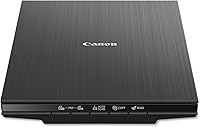
Epson V39 II vs Canon LiDE 400: Which Flatbed Wins? (October 2026)
The Epson V39 II is the better pick for books, albums and oversized scans, and the Canon LiDE 400 is the better pick for a USB-C laptop and quick EZ-button scans. Both scan at 4800 dpi, so the choice comes down to the lid, the software and the port.
On this page (19 sections)
- Which one scans old prints better?
- Books, albums and thick items
- Speed and what the numbers mean
- Connection and cable
- Software and scanning buttons
- Size, weight and desk space
- Compatibility before you buy
- Editing scans after you scan
- Daily use and the scanning routine
- Warranty and support
- Which flatbed wins for your job?
- Scanning a family album, page by page
- Setup on day one
- Who should pick each flatbed
- Keeping the glass clean
- A checklist before you order
- Who should not buy either
- Mistakes to avoid
- Epson V39 II vs Canon LiDE 400: the short answer
The Epson V39 II suits books, albums and oversized scans, and the Canon LiDE 400 suits a USB-C laptop and quick EZ-button scans. Both scan photos and documents at 4800 dpi, so the choice comes down to the lid, the software and the port.
Both are flatbeds that lay each print on the glass. Here is how they compare on prints, books, speed and setup.
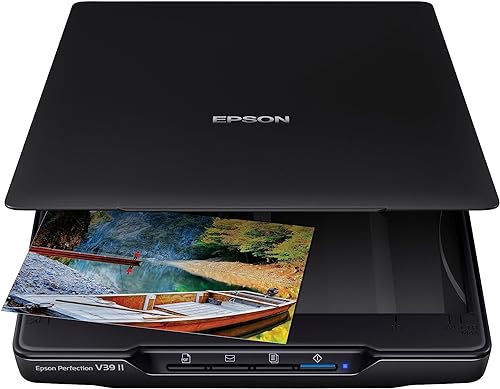 Best for books and oversized scans
Epson Perfection V39 II Flatbed Photo Scanner

Which one scans old prints better?
Both are capable on old prints. The V39 II has Easy Photo Fix, which Epson says restores faded color in one click.
Canon also names color restore and dust removal for the LiDE 400.
For a shoebox of family prints, either one gives sharp, clean files. The difference shows up when the job gets bigger than a few prints or when the originals are thick.
Books, albums and thick items
The V39 II has a high-rise removable lid, which Epson says is made for books and photo albums. That lid gives a thick item room to sit on the glass.
The LiDE 400 doesn't mention a high-rise lid. Check the lid height before you scan a thick album, since a flat lid may not clear a bulky book.
For a bound book or an album spread, the V39 II is the safer choice. It suits a family history project that goes beyond loose prints.
Speed and what the numbers mean
Canon says the LiDE 400 scans in as fast as 8 seconds. Epson says the V39 II scans a letter-size page in as fast as 10 seconds at 300 dpi.
The two makers measure speed differently, so treat the numbers as a rough guide. In practice, both are quick for a few pages and slower than a feeder for a long stack.
Connection and cable
Both scanners run from one USB cable that carries data and power, and neither has Wi-Fi. The LiDE 400 uses USB-C, so check that your computer has the port each cable needs.
The V39 II also includes Epson ScanSmart software, which can send scans to cloud storage services. Canon doesn't mention a cloud option for the LiDE 400.
Software and scanning buttons
The LiDE 400 has five EZ buttons and an auto scan mode, which detects what you are scanning. Its built-in PDF buttons create multi-page PDF files that are editable and searchable.
The V39 II uses Epson ScanSmart. That software stitches oversized images together and sends scans to cloud storage, and it includes OCR for editable Word files.
If you want a button that saves a searchable PDF, the LiDE 400 does that out of the box. If you want stitching and cloud uploads, the V39 II covers more ground.
Size, weight and desk space
Desk space for the V39 II and LiDE 400
The two are close in size. The V39 II is 9.9 inches wide and 1.5 inches tall, with a built-in kickstand, and the LiDE 400 is about 14.5 inches deep and 1.7 inches tall.
The V39 II weighs 3.1 pounds and the LiDE 400 weighs 3.6 pounds, so the Epson is the lighter of the two. Measure the depth of your desk before you order either one.
Compatibility before you buy
Canon lists Windows 7 through Windows 10, and macOS up to version 10.13 (High Sierra). The LiDE 400 also needs the ScanGear MP driver on Linux, so check your system before you order.
Epson lists Windows 7 as the minimum for the V39 II. Check Epson's own system requirements for your Mac or newer Windows version, since macOS support is the most likely place to run into trouble.
Editing scans after you scan
Both scanners come with enhancement options, but they work best as a starting point. Scan the print clean and flat, then make small edits afterward so the original detail stays intact.
The V39 II's Easy Photo Fix is a one-click correction for faded color. It is quick, but a heavy setting can make skin tones look flat, so compare the result with the print before you save over anything.
The LiDE 400's color restore and dust removal work the same way. Use them to clean up a scan, then keep an unedited copy of the raw scan in a separate folder.
Save the unedited scan as your archive copy. Any editing should happen on a second copy, so you can go back to the original if a setting goes wrong.
Daily use and the scanning routine
The LiDE 400 suits a routine where you scan a few items a day. Its EZ buttons and auto scan mode take the guesswork out of common jobs, since the scanner detects whether you are scanning a photo or a page.
The V39 II suits a session where the work changes from item to item. One-touch buttons handle the usual jobs, while the high-rise lid and the stitching tool handle the larger ones.
Both scanners reward a steady routine. Clean the glass, scan a test, then work through the pile in the same order each time so the files stay in sequence.
Warranty and support
Both scanners carry a one-year limited warranty. Keep the receipt and the model number with the warranty details in one place.
Which flatbed wins for your job?
Pick the V39 II if your work includes books, albums, oversized prints or stitched scans. It also suits anyone who wants Easy Photo Fix in the same box.
Pick the LiDE 400 if you want a USB-C cable, quick EZ buttons and a searchable PDF button. It is the simpler scanner for everyday paperwork and photos.
On our score, the V39 II edges ahead at 8.4 against 8.2 for the LiDE 400. The gap comes from the lid and the stitching, not from a bigger sensor.
Scanning a family album, page by page
Albums are the hardest job for either scanner. The page should lie flat, the spine should sit gently on the glass, and the photos should be scanned one page at a time rather than in one large pass.
The V39 II's high-rise lid gives an album more room, which means less pressure on the spine. With the LiDE 400, check the lid clearance before you start, since a thick album can keep the lid from closing flat.
If the photos are fragile, scan each page at the archive setting first and keep that file as the master copy. A second, smaller copy for sharing can come later.
Setup on day one
Neither scanner is plug and play. The LiDE 400 needs Canon's ScanGear MP driver installed.
The V39 II needs its software before you scan. Epson's footnote says an internet connection is required to download ScanSmart, so set it up on a machine that is online.
Both scanners include one-touch buttons, so the first scan doesn't have to wait for a long menu tour. Run a test print through each one, then check the file at full size before you start a big session.
Who should pick each flatbed
A family historian working through albums, letters and prints will get more from the V39 II. The high-rise lid and the stitching tool suit larger, mixed projects where a single scan is not the whole job.
Someone with a USB-C laptop and a box of prints will find the LiDE 400 easier to live with. It gives quick EZ buttons for a steady stream of scans.
Someone who mostly scans paperwork should look beyond both. A flatbed is slow on a long stack, and a feeder does that job better.
Keeping the glass clean
Both scanners are flatbeds, so the glass decides how clean each scan comes out. Wipe the glass with a soft cloth before each session, since dust and fingerprints show up on every copy.
Our guide to how to clean a flatbed scanner glass covers the safe way to do it.
A checklist before you order
Measure the spot where the scanner will sit, and leave room for the V39 II lid to lift. Note the height of the thickest item you plan to scan.
Confirm that your computer's operating system is on the maker's list. Check the version numbers, not just the name of the system, because support varies by release.
Decide whether you want cloud uploads and stitched scans, since the V39 II's ScanSmart software covers both. If you only need PDFs and quick scans, the LiDE 400's buttons are enough.
Who should not buy either
Neither scanner suits a big paperwork job. Both are flatbeds, so each page goes on the glass by hand, which makes a long stack slow.
Neither suits a wireless routine. Both connect by USB, so a phone-first habit or a network scan will need a different model.
Mistakes to avoid
The first mistake is choosing by resolution alone. Both scan at 4800 dpi, so the lid, software and port matter more.
The second is skipping a clearance check. The V39 II lid needs room to lift, and the LiDE 400 needs a clear path for its cable.
The third is buying a flatbed for a stack of 100 pages. A feeder is faster for that job, and a flatbed is best for prints and books.
Epson V39 II vs Canon LiDE 400: the short answer
Choose the Epson V39 II for books, albums and oversized scans. Choose the Canon LiDE 400 for USB-C and quick EZ-button scans.
For the review of each scanner, read the Epson Perfection V39 II review and the Canon LiDE 400 review. If you're also weighing a cheaper option, see Epson V19 II vs V39 II.
For the wider range of photo scanners, see our photo scanner buying guide.