Epson V19 II vs V39 II: Is the Upgrade Worth It? (October 2026)
The Epson V39 II is worth the upgrade only if you want to stitch oversized scans or send files to the cloud. For prints and books, the two share the same 4800 dpi optics, lid, kickstand and size, so the V19 II covers most homes.
On this page (19 sections)
- Epson V19 II vs V39 II: the short answer
- What both scanners share
- Prints and photos: the same result
- Books and albums: the same lid
- Stitching oversized images
- Cloud storage and sending scans
- Scanning to PDF or email
- Software and setup
- Speed and daily use
- Size, weight and desk space
- Warranty and support
- When the V39 II is worth the upgrade
- When the V19 II is enough
- A week of scanning with the V19 II
- A week of scanning with the V39 II
- Who should choose which
- Upgrading later
- Mistakes to avoid
- Is the upgrade worth it?
The Epson V39 II is worth the upgrade only if you want to stitch oversized scans or send files to the cloud. For prints and books, the V19 II and the V39 II share the same 4800 dpi optics, the same high-rise lid and the same size.
That makes this one of the closer pairs on our site. The gap comes down to two software features, not the scanner body, so the answer depends on how you plan to use the files.
Here is what the two share, where they differ and which one suits your collection.
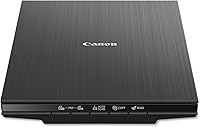
 Best for a budget flatbed
Epson Perfection V19 II Flatbed Photo Scanner
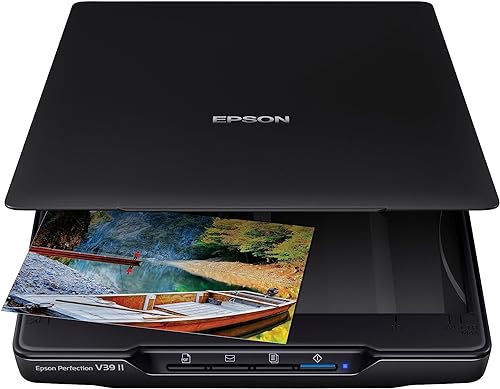 Best for books and oversized scans
Epson Perfection V39 II Flatbed Photo Scanner
Epson V19 II vs V39 II: the short answer
The V19 II covers the core job. You get 4800 dpi, Easy Photo Fix, a high-rise lid for books and albums, and a kickstand, all in a small body.
The V39 II adds stitching and cloud uploads through Epson's ScanSmart software, so those features decide the upgrade. If they don't matter to you, the V19 II does the same scanning work.
What both scanners share
Both scanners list a 4800 dpi optical resolution, and both use a CIS sensor design. They also share Easy Photo Fix, which Epson says restores faded color in one click.
Both have a high-rise removable lid for books and photo albums, and a built-in kickstand for upright storage. The size is the same, at 9.9 inches wide and 1.5 inches tall.
Both weigh 3.1 pounds and run on USB power. Epson lists a one-year limited warranty on each.
Prints and photos: the same result
Epson V19 II vs V39 II for prints
For old prints, the two scanners are close to identical. The same optics, the same color correction and the same resolution mean a print from one scanner looks like a print from the other.
If you scan a shoebox of family snapshots, the V19 II gives you the same files as the V39 II. The upgrade adds nothing to the picture itself.
Our guide to the best way to scan old photos at home explains the settings that matter most for prints, and they apply to both.
Books and albums: the same lid
Both scanners use the same high-rise removable lid, so books and albums fit the same way on either one. Scan with the spine open and the page flat, and avoid pressing down hard.
Neither scanner is a book cradle, so a tight binding can still give an uneven scan. Check the edge of each page before you save the file.
If you plan to scan a family album, the lid is the same on both, so the choice comes down to the software features.
Stitching oversized images
The V39 II's ScanSmart software can stitch together oversized images. That helps with a large print, a poster or a page that is too big for one pass on the glass.
The V19 II does not list stitching in its features. If you regularly scan items that are bigger than one scan area, the V39 II is the better buy.
Stitching depends on a clean first pass, so keep the scanner still and keep the prints flat between passes. Check the joins on screen before you save the final file.
Cloud storage and sending scans
The V39 II can send scans to cloud storage services through ScanSmart. That gives you an offsite copy as soon as the scan is done, without a separate transfer.
The V19 II is built around simpler output. Its one-touch buttons scan directly to PDF or email, which suits a quick file to send but not a cloud-first routine.
If you want your scans backed up to the cloud by default, the V39 II covers that. If you prefer to copy files to a drive or send them by email, the V19 II is enough.
Scanning to PDF or email
The V19 II's one-touch buttons scan directly to PDF or email. That is useful for a document you need to send at once, such as a form or a letter.
The V39 II also has one-touch buttons for the same quick routine. The difference is the cloud option, not the basic PDF routine.
Both scanners include OCR software for searchable PDFs. Use it for a letter or a family recipe you want to search later.
Software and setup
Both scanners use Epson's ScanSmart software. For the V39 II, Epson notes that ScanSmart needs an internet connection to download, and its cloud and stitching features need the software on a connected Windows PC or Mac.
Epson lists stitching and cloud sending only for the V39 II, even though the software is shared. If those features decide your choice, check Epson's support page for the V19 II first.
Set up the software on the same computer you plan to use for scanning. Then run a test scan of a photo and a page on each scanner before you start a big session.
Check the minimum system requirements. Epson lists Windows 7 as the minimum for both models, so an older computer may need an update first.
Speed and daily use
Epson says both scanners scan a letter-size page in as fast as 10 seconds at 300 dpi. The speed does not separate them.
Daily use is also the same. Set the scanner up on a flat spot near the computer, clean the glass and work through the pile in the same order each time.
The V39 II's extra features cost time only if you use them. If you scan one print at a time and never stitch, the workflow is the same on both.
Size, weight and desk space
Both scanners are 9.9 inches wide and 1.5 inches tall, and both weigh 3.1 pounds. The desk space and the lid clearance are the same.
If your desk is tight, measure the lid's open height on either model before you buy. The high-rise lid needs room above the glass.
The kickstand works the same way on both, so the scanner can stand upright when it is not in use.
Warranty and support
Both carry a one-year limited warranty from Epson. Keep the receipt and the model number together for any claim.
Check the warranty terms for your country before you buy. Coverage details can differ by region.
When the V39 II is worth the upgrade
Pick the V39 II if you plan to stitch oversized prints or pages. It also suits anyone who wants cloud uploads built into the routine.
It is also the better pick if your family history project includes large items that won't fit on the glass in one pass. The stitching tool handles that job.
If you think you might need these features in the future, the V39 II gives you room to grow without a new scanner.
When the V19 II is enough
Pick the V19 II if your scans are prints, books and albums that fit on the glass in one pass. It gives you the same optics, lid and color correction for less.
It is also the right choice if you save files to a drive or send them by email. You don't need cloud uploads for that workflow.
For most family photo projects, the V19 II is the sensible buy. It is the budget pick in this pair, and it delivers the same scans for the core job.
A week of scanning with the V19 II
A week with the V19 II is simple. You scan a box of prints early in the week, sort the files and share a few favorites with family, all from one scanner and one computer.
Nothing in that routine needs the cloud. The one-touch button sends a PDF or an email when you need one, and the scans stay on your own drive.
For many homes, that is the whole job. The V19 II gives the same archive quality as the V39 II for the same work.
A week of scanning with the V39 II
The V39 II's week looks similar, with two extra steps. You stitch any oversized item in ScanSmart and send the finished file to cloud storage, so a backup exists before you leave the desk.
Those steps add a little time to each job, and they pay off when the work needs them. A family history project with large documents benefits most from that routine.
Who should choose which
Choose the V19 II if your scanning is mostly prints, books and albums that fit on the glass. It is the simpler buy for the same core results.
Choose the V39 II if you expect to scan oversized items or want cloud backups built into the routine. The extra features earn their keep in that case.
Upgrading later
If you start with the V19 II and find you need stitching later, you can move to the V39 II without losing the scanning habits you already have. The lid, the size and the button routine carry over.
Plan the first few months before you decide. A short trial of your real collection will show whether the extra software is worth the time.
Mistakes to avoid
The first mistake is paying for stitching you will never use. Ask yourself whether your scans ever exceed the glass size.
The second is assuming the V39 II scans photos better. Both use the same optics, so the difference is in the software, not the picture.
The third is skipping the software setup. ScanSmart needs an internet connection and the right computer, so set it up before you start the project.
Is the upgrade worth it?
The V39 II is worth the upgrade if stitching and cloud uploads will change your workflow. Otherwise, the V19 II gives you the same scanner for the job of scanning old photos and books.
For a closer look at the V39 II, read the Epson Perfection V39 II review. For the wider field of flatbeds, see the best flatbed scanners for photos.
For the wider range of photo scanners, see our photo scanner buying guide.
Frequently asked questions
Is the Epson V39 II worth it over the V19 II?
Only if you need stitching or cloud uploads. The two scan the same way, with the same 4800 dpi optics, lid and size, so the V39 II is an upgrade for a specific workflow rather than a better scan.
Do the V19 II and V39 II have the same resolution?
Yes. Both list a 4800 dpi optical resolution and use the same CIS sensor design, so the difference in scan quality is small for prints and books.
Can the V19 II stitch large scans?
Not in the features Epson lists for it. The stitching tool and the cloud upload features are listed for the V39 II, so choose that model if you need them.
Do both scanners have Easy Photo Fix?
Epson lists Easy Photo Fix on both, which brings back color on faded photos in one click. Use it as a starting point and keep the unedited scan as your archive copy.