Epson Perfection V39 II Review: Flatbed Photo Scanner (October 2026)
The Epson Perfection V39 II is a 4800 dpi flatbed with a high-rise lid, so it suits books, albums and old prints. It needs a computer and an internet connection for its full software, and it has no Wi-Fi or feeder, so it is a desk tool rather than a stack-scanning machine.
On this page (16 sections)
- The Epson Perfection V39 II in brief
- Is the Epson V39 II good for old prints?
- Epson V39 II problems to check before you buy
- Is the Epson Perfection V39 II good for a home office?
- Specs at a glance
- Photo features and color correction
- Books, albums and high-rise scanning
- Stitching, cloud and ScanSmart
- Speed and daily use
- Size, weight and desk space
- Connection and setup
- Warranty and support
- Who the V39 II suits
- How the V39 II compares with the LiDE 400
- Who should skip the V39 II
- Is the Epson V39 II right for you?
The Epson Perfection V39 II is a 4800 dpi flatbed with a high-rise lid, which makes it a good fit for books, albums and old prints. It is a desk tool, not a stack scanner, and its full software needs an internet connection to download.
Our score for the V39 II is 8.4. The reasons come down to the lid, the color correction and the software features, which cover more ground than a basic flatbed.
We compared its specs, software notes and size with the other flatbeds on this site. Here is what it does well, what to check and who should choose something else.
The Epson Perfection V39 II in brief
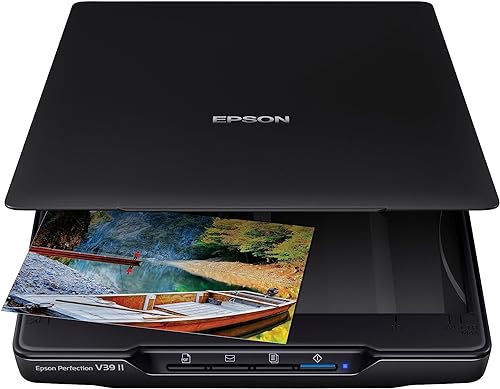
Epson Perfection V39 II Flatbed Photo Scanner
- 4800 dpi optical resolution
- Easy Photo Fix for faded color
- High-rise removable lid
- Built-in kickstand
A flatbed for prints, books and albums, with a high-rise lid and ScanSmart software for stitching and cloud uploads.
Pros
- High-rise lid takes books and albums
- Easy Photo Fix restores faded color
- Stitches oversized scans and sends them to the cloud
- Built-in kickstand for upright storage
Cons
- Needs an internet connection for the full software
- Letter-size pages take about 10 seconds at 300 dpi
Is the Epson V39 II good for old prints?
Yes. It scans prints at 4800 dpi, and Easy Photo Fix can bring back faded color in one click, which helps with snapshots that have lost their warmth.
It is also a good fit for prints that are larger or thicker than a snapshot. The glass takes letter-size material, and the high-rise lid lets you scan a bulky page without crushing its spine.
For the full method, read the best way to scan old photos at home. It walks through the steps that matter most with a flatbed.
Epson V39 II problems to check before you buy
The first thing to check is the software. Epson says ScanSmart needs an internet connection to download, so a computer without a connection can't set up the full feature set.
The second is the connection, since the V39 II is USB only with no Wi-Fi. It needs a computer nearby, and it cannot send files on its own without one.
The third is the system requirement, since Epson lists Windows 7 as the minimum. Check the requirements for your exact computer and operating system version before you order.
The fourth is speed. Epson says a letter-size page scans in as fast as 10 seconds at 300 dpi, which is fine for a few pages and slow for a stack.
The fifth is desk space. It is 9.9 inches wide and 1.5 inches tall, and the lid needs room to open fully, so measure the depth of your desk first.
Is the Epson Perfection V39 II good for a home office?
It is good for a light office load. The one-touch buttons handle common jobs, and ScanSmart lets you send scans to cloud storage services once it is installed.
It is not a document feeder, so each page goes on the glass by hand. A feeder suits a long pile of paperwork better, and the best document scanner for home guide shows the options.
Specs at a glance
The V39 II is a flatbed with a built-in kickstand and a removable lid. The main numbers are below.
| Spec | Epson Perfection V39 II |
|---|---|
| Optical resolution | 4800 dpi |
| Width and height | 9.9 in wide, 1.5 in tall |
| Weight | 3.1 lb |
| Connection | USB, no Wi-Fi |
| Lid | High-rise, removable |
| Stand | Built-in kickstand |
| Software | Epson ScanSmart, with OCR |
| Warranty | 1-year limited |
Our score weighs specs, features and buyer feedback against what you're shopping for.
Photo features and color correction
Easy Photo Fix is the feature that makes this scanner a good choice for old prints. Epson says it brings back color on faded photos in one click, which helps with snapshots that have lost their color.
Use it as a starting point, not a final answer. A heavy correction can flatten tones, so keep the raw scan as the archive copy and make any fix on a second file.
The 4800 dpi optical resolution gives you room to crop and enlarge. For a print you plan to frame, that resolution keeps fine detail such as faces and text sharp.
Books, albums and high-rise scanning
Epson Perfection V39 II for books and albums
The high-rise removable lid is the main reason to pick the V39 II over a basic flatbed. Epson says it fits books and photo albums, so a thick volume can sit on the glass without forcing the lid down.
Scan a book with the spine open and the page flat, and avoid pressing down hard. The lid is there to hold the page, not to flatten a tight binding.
If you don't scan books, the lid still helps with thick photo mounts and albums. Test one page first, then check the scan at full size.
Stitching, cloud and ScanSmart
ScanSmart is the software layer that sets the V39 II apart. Epson says it can stitch together oversized images, which helps with a large print or a page too big for one scan.
It can also send scans to cloud storage services. Epson's note says that needs ScanSmart installed on a connected Windows PC or Mac and an internet connection.
OCR is included for turning scans into editable Microsoft files, which helps when a page is text heavy, such as a letter or a family recipe.
Speed and daily use
Epson says the V39 II scans a letter-size page in as fast as 10 seconds at 300 dpi. That speed suits a few pages at a time.
The one-touch buttons take the guesswork out of common jobs. Press a button, and the scanner runs with the settings you chose.
For a long session, feed the work in batches. Clean the glass before you start, then scan in the same order so the files stay easy to sort.
Size, weight and desk space
The V39 II is 9.9 inches wide and 1.5 inches tall, and it weighs 3.1 pounds. That is light for a flatbed with a high-rise lid.
The built-in kickstand lets you stand the scanner upright for storage. That saves room on a shelf or in a closet when you're not scanning.
Leave space above the lid, and keep the cable where it won't catch on a chair or a bag.
Connection and setup
The V39 II connects over USB and draws its power from the cable. There is no Wi-Fi, so it needs a computer nearby for every scan.
Install ScanSmart once you have an internet connection. Then run a test scan of a photo and a page, and check the file at full size before you start a big session.
Keep the software updated so the features stay current.
Warranty and support
Epson gives the V39 II a one-year limited warranty. Keep the receipt, the box and the model number together, since a claim needs the purchase date.
Read the warranty terms for your region before you buy. Coverage details can differ by country.
Who the V39 II suits
The V39 II suits a family history project with mixed items, where prints, books and the occasional oversized page all land on the same desk. It also suits someone who wants stitching and cloud uploads in the same software.
It is a weaker fit for a quick, wireless routine. A phone-first habit will not work with a USB-only scanner, so plan the desk around the cable.
If your collection is mostly prints and you don't need the extra software, the V19 II covers the same core job. Our V19 II vs V39 II comparison explains the difference in detail.
How the V39 II compares with the LiDE 400
The Epson V39 II and the Canon LiDE 400 both scan at 4800 dpi. The V39 II wins on the high-rise lid, the kickstand and the stitching and cloud features.
The LiDE 400 wins on the port and the quoted speed. It uses a USB-C cable, has EZ buttons with auto scan mode, and Canon quotes 8 seconds a page against Epson's 10.
For a side-by-side look at both, read Epson V39 II vs Canon LiDE 400. It covers which one suits books, albums and a tight desk.
Who should skip the V39 II
Skip it if you need Wi-Fi or a phone-first workflow, since the V39 II has no wireless connection. A Wi-Fi model suits that routine better.
Skip it if you scan a long stack of paperwork every day. A feeder is faster, and the V39 II is better used for prints and books.
Skip it if your computer is older than Epson's minimum requirement. Check the system needs before you order, so the scanner does not sit unused.
Is the Epson V39 II right for you?
Pick the Epson Perfection V39 II if you want a flatbed for old prints, books and albums, with a high-rise lid, Easy Photo Fix and cloud-ready software. It is the stronger choice for a family history project.
Pick something else if you need Wi-Fi or a feeder. For more flatbeds that suit family photos, see the best flatbed scanners for photos.
For how a flatbed fits with feed-through and film scanners, see our photo scanner buying guide.
Frequently asked questions
Is the Epson Perfection V39 II good for old photos?
Yes, it scans prints at 4800 dpi with Easy Photo Fix for faded color. Its high-rise lid also takes a thick album page, so it suits a family collection that mixes prints and books.
Does the Epson Perfection V39 II have Wi-Fi?
It connects by USB and is powered over that cable, with no Wi-Fi. For a scanner that works wirelessly, a model such as the FastFoto or the ScanSnap is the better fit.
Does the V39 II need software to scan?
Yes, for the full set of features. Epson says ScanSmart needs an internet connection to download, and the cloud and stitching features need it installed on a Windows PC or Mac.
Is the Epson V39 II better than the V19 II?
They share the same 4800 dpi optical resolution and most of the same design. The V39 II adds ScanSmart stitching and cloud uploads, so it is the better pick if those features matter to you.