Canon CanoScan LiDE 400 Review: Slim Flatbed Scanner (October 2026)
The Canon CanoScan LiDE 400 is a USB-C flatbed for prints and documents, with one cable and quick EZ buttons. It suits a steady stream of everyday scans, but it has no Wi-Fi and its macOS support stops at High Sierra.
On this page (15 sections)
- The Canon LiDE 400 in brief
- Is the Canon LiDE 400 good for old prints?
- Canon LiDE 400 problems to check before you buy
- Is the Canon LiDE 400 good for a home office?
- Who the Canon LiDE 400 suits
- Specs at a glance
- Scan quality and enhancements
- Speed and daily use
- Size, weight and desk space
- Connection and setup
- Software and driver support
- How the LiDE 400 compares with the V39 II
- Warranty and support
- Who should skip the Canon LiDE 400
- Is the Canon LiDE 400 right for you?
The Canon CanoScan LiDE 400 is a USB-C flatbed for prints and documents, with one cable and quick EZ buttons. It is a sensible choice for a steady stream of everyday scans.
It has real limits, though. It connects by USB only, with no Wi-Fi, and Canon's macOS support stops at High Sierra.
We compared its specs, size and software notes with the other flatbeds on this site. Here is what the LiDE 400 does well, where it falls short and who should pick a different scanner.
The Canon LiDE 400 in brief
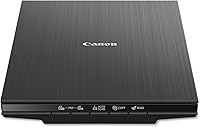
Canon CanoScan LiDE 400 Slim Scanner

- 4800 x 4800 dpi resolution
- One USB-C cable for data and power
- Five EZ buttons with auto scan mode
- Built-in PDF buttons for multi-page files
A flatbed with one USB-C cable and EZ buttons for everyday prints and paperwork.
Pros
- EZ buttons keep everyday scans quick
- One USB-C cable for data and power
- Auto scan mode detects photos and pages
- Built-in PDF buttons for multi-page files
Cons
- USB only, with no Wi-Fi
- Canon lists macOS only up to High Sierra
- Largest scan is letter or A4 size
Is the Canon LiDE 400 good for old prints?
Yes, for prints up to letter size. It scans at 4800 dpi and includes color restore and dust removal, so it can give clean, sharp files from a box of family snapshots.
It does not suit every print, though. Its glass takes letter and A4 pages, so an oversized print or a bulky album will not fit, and a thick item may not lie flat under the lid.
For a flatbed that adds a high-rise lid for books, the Epson V39 II review covers the alternative. Our guide to the best way to scan old photos at home explains the full method.
Canon LiDE 400 problems to check before you buy
The main issue is the connection, since the LiDE 400 uses USB only with no Wi-Fi. It has to sit near a computer with a free USB-C port, so it is the wrong scanner if you want to scan from a phone or tablet.
The second issue is macOS, where Canon lists support from 10.11 up to 10.13, High Sierra. Check your Mac version before you order, since a newer system may not run the driver.
The third issue is size, since the largest scan is 8.5 by 11.7 inches, letter or A4. Anything bigger needs a different tool, because a poster or a wide print will not fit the glass.
Last, the scanner needs its ScanGear MP driver on Linux. That is a small step, but it can take time on an unfamiliar system.
Is the Canon LiDE 400 good for a home office?
Yes, for a light office load. Its auto scan mode detects whether you are scanning a photo or a page, and the built-in PDF buttons create multi-page searchable files.
It is not a document feeder. Each page goes on the glass by hand, so a long contract will take more time than a sheetfed scanner would need.
If your main job is paperwork, the best document scanner for home guide shows the feeders that suit a stack of pages.
Who the Canon LiDE 400 suits
The LiDE 400 suits someone with a computer that stays put and a box of prints and documents to scan now and then. It is also a good fit for a home office that needs a simple scanner for receipts, forms and letters.
It is less suited to a family history project with albums. The glass takes letter and A4 sheets, and the LiDE 400 doesn't list a high-rise lid, so a thick volume needs a different tool.
If you're not sure which group you fall into, start with where the scanner will sit. It is about 14.5 inches deep, and the USB-C cable decides how close it has to be to your computer.
Specs at a glance
The LiDE 400 is a flatbed in black, with a USB-C connection and one cable. The main numbers are below.
| Spec | Canon LiDE 400 |
|---|---|
| Resolution | 4800 x 4800 dpi |
| Depth and height | About 14.5 in deep, 1.7 in tall |
| Weight | 3.6 lb |
| Connection | USB-C, USB only, no Wi-Fi |
| Largest scan | Letter or A4 |
| Buttons | Five EZ buttons with auto scan mode |
| Color depth | 48-bit color, 16-bit grayscale |
| Warranty | 1 year |
Our score weighs specs, features and buyer feedback against what you're shopping for.
Scan quality and enhancements
The 4800 dpi optical resolution is more than enough for prints you plan to share or enlarge a little. The 48-bit color depth keeps the tones in old photos, which helps when the print has faded areas.
Canon includes color restore and dust removal as enhancements. They help a rough scan, but keep the unedited copy as the archive file, so a heavy correction never replaces the original detail.
Canon lists the resolution as 4800 x 4800 dpi. For a print you plan to frame or enlarge, that leaves room to crop without losing much sharpness.
Speed and daily use
Canon LiDE 400 speed and EZ buttons
Canon says the LiDE 400 can scan in as little as 8 seconds. That is quick for a few prints or a handful of documents, and it keeps a scan session moving.
The five EZ buttons make the routine simple. The built-in PDF buttons turn a stack of pages into one multi-page file, so you don't have to fiddle with settings for each job.
Auto scan mode is the feature many people will use most. It reads the item on the glass and sets the scan type, so you don't need to dig through menus for each job.
Size, weight and desk space
Canon sells the LiDE 400 as a slim scanner, but it is about 14.5 inches deep and 1.7 inches tall, close to the Epson flatbeds in height. Measure the depth of your desk, and leave room for the lid to open.
At 3.6 pounds, it is light enough to move when you need the desk space back.
Before you set it down, check where the USB-C cable reaches, so the scanner sits near the computer without a stretched cable.
Connection and setup
The LiDE 400 connects with one USB-C cable that carries both data and power. That keeps the setup tidy, and there is no separate power brick to hide.
There is no Wi-Fi, so you can't scan straight to a phone or cloud service without a computer. Plan on the scanner living next to the machine you will scan to.
Set up the driver and software first, then run a test scan of a photo and a page to check the settings before you start a big batch.
Software and driver support
Canon lists Windows 7, 8.1 and 10 as supported systems. On macOS, Canon's list ends at version 10.13, High Sierra, so newer Macs may not work with the included driver.
On Linux, the LiDE 400 needs the ScanGear MP driver. Install it before you start, and expect a few extra steps if your system is not common.
If a newer system matters to you, check Canon's driver page for your exact version before you order.
How the LiDE 400 compares with the V39 II
The LiDE 400 and the Epson V39 II both scan at 4800 dpi, so the sensor does not set them apart. The V39 II adds a high-rise lid for books and albums, plus ScanSmart stitching and cloud uploads.
The LiDE 400 wins on the port and the quoted speed. It uses a USB-C cable that suits newer laptops, and Canon quotes 8 seconds a page against Epson's 10.
For the full side-by-side, read Epson V39 II vs Canon LiDE 400. It covers which scanner suits books, albums and a tight desk.
Warranty and support
Canon gives the LiDE 400 a one-year warranty. Keep the receipt and the model number together in one place, so a claim or return is quick.
Check the warranty terms for your country before you buy, since coverage can differ by region.
Who should skip the Canon LiDE 400
Skip it if you need Wi-Fi, because the LiDE 400 has none. A Wi-Fi model is the better fit for scanning from a phone or tablet.
Skip it if you use a newer Mac that is outside Canon's macOS list. A scanner that can't run its driver is a poor buy, however good the hardware is.
Skip it if your prints are larger than letter or A4, or if you scan thick albums often. The V39 II's high-rise lid suits that job better.
Is the Canon LiDE 400 right for you?
Pick the Canon CanoScan LiDE 400 if you want a flatbed with one USB-C cable and quick EZ buttons for prints and documents. It is a tidy choice for a steady routine.
Pick a different scanner if you need Wi-Fi, a high-rise lid or a newer macOS driver. For the wider field of flatbeds, see the best flatbed scanners for photos.
For how a flatbed fits with feed-through and film scanners, see our photo scanner buying guide.
Frequently asked questions
Is the Canon LiDE 400 a good scanner for old photos?
It is a good choice for prints up to letter size. It scans at 4800 dpi and includes color restore and dust removal, so it suits a steady set of family prints, though a thick album or an oversized print will not fit its glass.
Does the Canon LiDE 400 have Wi-Fi?
The LiDE 400 connects by USB only, using a single USB-C cable for data and power. For a wireless phone scan, look at a Wi-Fi model such as the ScanSnap or the FastFoto.
Does the Canon LiDE 400 work on a Mac?
Canon lists macOS support up to version 10.13, High Sierra. Check your Mac's version before you buy, and confirm that the driver installs on your system, because newer macOS releases may not be in Canon's list.
How long does the Canon LiDE 400 take to scan a page?
Canon says the LiDE 400 can scan in as little as 8 seconds. That speed suits a few pages a day, but for a long stack a feeder is the faster tool.