Flatbed vs Sheetfed Scanner: Which Do You Need? (October 2026)
A flatbed scanner suits photos, books and fragile prints, and a sheetfed scanner suits stacks of paper. Pick by what you scan most, because a sheetfed can crease a photo and a flatbed is slow on a long stack.
On this page (17 sections)
- How each scanner moves the page
- Which is faster for a stack of paper?
- What a flatbed does better
- What a sheetfed scanner does better
- Paper that feeds and paper that doesn't
- Photos and fragile paper
- Scan quality and software
- Books, bound pages and odd items
- Maintenance and wear
- Warranty and support
- Time for a mixed week
- Learning curve and setup
- Space and setup
- What to check before you buy
- Which one fits your papers
- Common mistakes when choosing
- Flatbed scanner vs sheetfed: the short answer
Get a flatbed scanner for photos, books and fragile prints, and a sheetfed scanner for stacks of paper. A flatbed lays the page on glass one sheet at a time, while a sheetfed pulls a stack through rollers, which is quick for paper but rough on photos and books.
Here is how the two compare on speed, fragile prints, books and space.
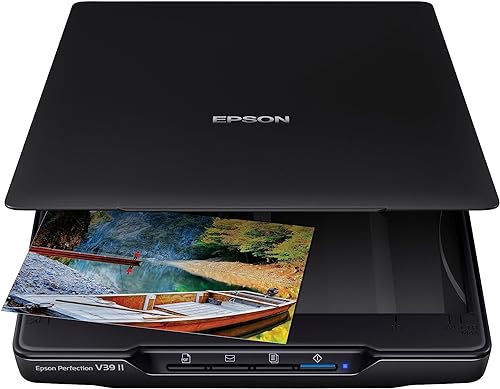 Best for books and oversized scans
Epson Perfection V39 II Flatbed Photo Scanner
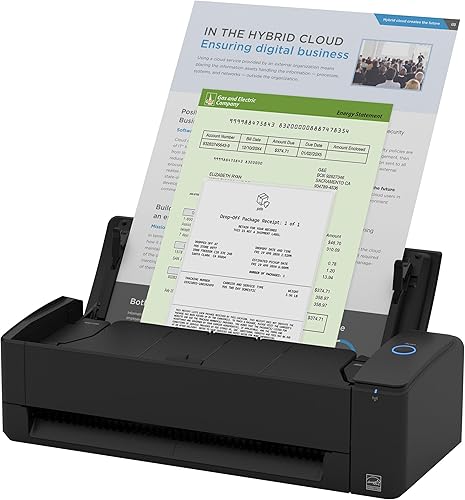
How each scanner moves the page
A flatbed scanner has a glass bed and a lid. The page stays still while a light bar moves underneath it, so the paper never leaves the glass.
A sheetfed scanner works the other way. The paper moves through the machine past a fixed sensor, with rollers that grip each sheet and pull it along.
That one difference explains most of the trade-offs. A still page is gentle and precise, while a moving page is fast and tolerant of a stack.
Which is faster for a stack of paper?
A sheetfed scanner is faster for paper. The iX1300 holds 20 sheets and scans both sides of each one, and ScanSnap rates it at up to 30 pages per minute.
A flatbed works more slowly on paper. Epson says its V39 II scans a letter-size page in as fast as 10 seconds at 300 dpi, so a flatbed suits a few pages well and a 60-page stack poorly.
What a flatbed does better
A flatbed lifts the page off the feed path entirely. Nothing pulls the sheet through rollers, so a curled photo, a brittle print or a thin letter stays out of harm's way.
It also handles things a feeder cannot take at all. The V39 II has a high-rise removable lid, which Epson says is made for books and photo albums, and the page can sit flat while you scan it.
Easy Photo Fix is the other reason many people pick a flatbed. Epson says the feature brings back color on faded prints in one click, which helps with old family snapshots.
What a sheetfed scanner does better
A sheetfed scanner is built for paper that moves. The feeder pulls each page in, the iX1300 scans both sides in one pass, and it removes blank pages on its own.
Automatic de-skew straightens a page that feeds at a slight angle, so the scan comes out level. That saves time when you scan receipts, forms and letters in bulk.
It also connects over Wi-Fi or USB, so you can pick whichever link suits your desk. For a steady flow of paperwork, that choice saves time each week.
Paper that feeds and paper that doesn't
A sheetfed scanner takes plain office paper, receipts and most letters without trouble. The paper needs to be flat, dry and close to standard size, so a crumpled receipt may need smoothing first.
A flatbed takes almost any flat item. That includes a letter with a torn edge, a photo with a sticker on it or a card with a raised edge, as long as it lies flat on the glass.
Photos and fragile paper
A sheetfed scanner can take a stack of plain, flat photos. It is a poor fit for a curled print, a thick photo mounted on card, or a print with a crack along the edge.
For old prints, a flatbed is the safer path. Our guide on how to scan old photos at home explains the flatbed approach step by step.
Scan quality and software
Flatbed scanner vs sheetfed software
Both types can give clean scans of text. The iX1300 is rated at 600 dpi, and the V39 II is rated at 4800 dpi optical resolution, so the flatbed has far more room for fine detail.
For paperwork, most people never need that detail. A clean 300 dpi text scan is easy to read and easy to search once it has passed through OCR.
The software matters as much as the hardware, and the V39 II's ScanSmart can stitch oversized images, send scans to cloud storage and run OCR for editable Word files. The iX1300 works with ScanSnap Home, which brings its scanning functions together, and the quick menu sends each scan to your favorite apps by drag and drop.
Books, bound pages and odd items
Books and bound pages need a flatbed. A feeder needs loose sheets that bend a little, and a bound book will not feed at all.
The V39 II's high-rise lid helps here too. That gives a thick book room to open on the glass, which a feeder cannot take at all.
Odd items such as ID cards and receipts are different. The iX1300 handles thick items and plastic cards, which makes it useful for a home office.
Maintenance and wear
A flatbed asks for very little. Keep the glass clean, close the lid gently and check that nothing has settled under the cover.
A sheetfed scanner needs a little more care, since its rollers pick up paper dust and ink over time.
Clean them on a schedule to keep the feed smooth. Feeders also wear, so a worn pad or roller can cause a double feed, which can crease a page.
Dust on a flatbed glass shows up on every scan, while a dirty feeder shows up as jams. Both are simple to fix, but they call for different habits.
Warranty and support
The V39 II carries a one-year limited warranty from Epson. The iX1300 carries a one-year depot warranty from ScanSnap.
Keep the receipt and the model number together with the warranty details. Either scanner is easier to service when you can show the purchase date.
Time for a mixed week
Picture a normal week with a box of old photos and a pile of bills. A flatbed takes the photos slowly and carefully, one at a time.
The same week with a sheetfed scanner clears the bills in a few minutes. The photos still need the flatbed, which is why many homes end up with both.
If the pile is mostly paper, a sheetfed scanner saves the most time. If the pile is mostly photos and books, the flatbed is the one you'll reach for.
For a feeder that handles prints, compare the Epson FastFoto vs ScanSnap iX2500 post.
Learning curve and setup
A flatbed is the easier of the two to learn. You place the item, close the lid and press scan, so there is little to get wrong on the first day.
A sheetfed scanner takes a little more practice. Fan the stack, line up the edges and set the feed guide, so the pages move through without a double feed.
Space and setup
The two types take up different room. The iX1300 measures 4.5 inches deep, 11.7 inches wide and 3.3 inches tall, so it fits a narrow shelf or a corner of the desk.
The V39 II is 9.9 inches wide and 1.5 inches tall, with a lid that lifts above the glass. Give it enough room to open the lid fully, or the lid will hit the wall.
What to check before you buy
Look at the feeder size first if your work is paper. The iX1300 holds 20 sheets, and that number tells you how often you will need to refill.
Check the glass size and the lid height if your work is photos or books. The V39 II's high-rise lid is a clear example of a feature to look for, since it decides how thick an item can be.
Try a real batch of your own papers and prints before you decide. Time how long each one takes, and note how often you have to fix a jam or a crooked scan.
For something you can carry, the Epson ES-50 review covers a light sheet-fed option.
Which one fits your papers
Pick a flatbed if you scan photos, books, albums or anything you can't feed through rollers. It is the choice for family memories, and it gives you the most control over fragile originals.
Pick a sheetfed scanner if you scan letters, receipts, forms and other paper in batches. It saves hours when the pile is long and the pages are in good shape.
Pick both if your house has old photos and a steady flow of paperwork. A flatbed for prints and a compact feeder for papers covers almost every home job.
Common mistakes when choosing
The first mistake is buying a sheetfed scanner to scan family photos. A feeder can crease or tear a print, and the damage cannot be undone.
The second is buying a flatbed for a large pile of paperwork. You will spend more time feeding one sheet at a time than you saved on the purchase.
The third is skipping the space check. A flatbed lid needs room to open, and a sheetfed scanner needs a flat spot where pages can exit.
Flatbed scanner vs sheetfed: the short answer
For photos, books and fragile prints, a flatbed scanner is the right tool. For stacks of paper, a sheetfed scanner saves time and keeps your desk tidy.
If you're also weighing a flatbed against a phone, read photo scanner vs phone app next. For a wider look at flatbeds that suit family photos, see the best flatbed scanners for photos.
Our photo scanner buying guide sorts every scanner type on this site in one place.
Frequently asked questions
Is a flatbed or sheetfed scanner better for photos?
A flatbed is the better choice for photos, since it lays each print flat on the glass. A sheetfed scanner suits plain paper and can crease an old print.
Which is faster, a flatbed or a sheetfed scanner?
A sheetfed scanner is faster for a stack of paper. A flatbed scans one page at a time, so it suits a few pages or a photo, while a feeder handles a whole batch.
Do I need both a flatbed and a sheetfed scanner?
Many homes do fine with one. If you scan old photos and a steady stream of papers, a flatbed for prints and a compact sheetfed for paperwork covers both jobs well.



