Does the Canon LiDE 400 Scan Slides?
No, the Canon LiDE 400 does not scan slides. It's a flatbed document and photo scanner with a white lid light, so there's no way to shine light through a mounted 35mm slide. You need a dedicated film and slide scanner for that.
On this page (7 sections)
- Why can't the Canon LiDE 400 scan slides?
- What does a slide scanner do that a flatbed doesn't?
- Can you scan slides on the LiDE 400 with a workaround?
- Which slide scanner should you buy instead?
- How do you scan a box of slides without a computer?
- Is the Canon LiDE 400 still worth buying for photos?
- What's the bottom line on the Canon LiDE 400 and slides?
No, the Canon LiDE 400 does not scan slides. It's a flatbed document and photo scanner, and its lid holds a white light for reflecting off paper, not a film light for shining through a slide.
If you're asking does the Canon LiDE 400 scan slides, the honest answer is no: you need a dedicated film and slide scanner.
That's the short version. The longer answer covers why flatbeds struggle with slides, what a slide scanner does differently, and which models handle your box of 35mm mounts without a computer.
Why can't the Canon LiDE 400 scan slides?
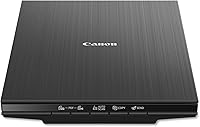
The LiDE 400 scans by bouncing light off a flat surface, and a slide needs light passed through it from behind. A 35mm slide is a small piece of transparent film in a mount, so a reflective flatbed sees a dark rectangle instead of a photo.
Canon's LiDE line is built for documents and photo prints. It's a slim, USB-powered flatbed on which you lay paper flat on the scanning glass, and its lid carries a white backing that helps reflect light evenly.
That design works for paper, not for film.
To scan film on a flatbed, the lid needs a transparency unit: a second light source above the glass that shines down through the slide. The LiDE 400 doesn't have one.
You can read more about what flatbeds can and can't do in our guide to whether you can you scan slides with a flatbed scanner.
What does a slide scanner do that a flatbed doesn't?
A slide scanner shines light through the film and captures the result with a sensor or camera built for transparencies. That backlight is the whole difference.
It turns a slide from an opaque chip into a bright, readable image.
Most home slide scanners also add a holder that positions each mount precisely over the light. Some feed slides in a tray; others take one at a time.
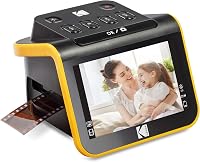
The KODAK SLIDE N SCAN, for example, uses quick-loading inserts and includes a 50mm slide holder plus adapters for 135, 110 and 126 film.
The result is a JPEG you can keep. You don't need photo-editing software to get a usable image, though you can adjust color and brightness on the device itself.
For a full comparison of what's out there, see our roundup of the best slide scanner options for home use.
Can you scan slides on the LiDE 400 with a workaround?
Not really. You can place a slide on the glass and scan it, but the result comes out dark and unusable because there's no light behind the film.
Some people try laying a phone flashlight over the slide, but the light is uneven and the colors come out wrong.
The workaround that actually works is a different device. A film scanner with a backlight does the job the LiDE 400 can't.
If you only have a handful of slides, a photo lab or a mail-in digitizing service may be cheaper than buying hardware. For a full box, a home scanner pays for itself.
Don't try to modify the LiDE 400's lid or wedge a light into it. You'd risk damaging a scanner that works fine for documents and prints.
Which slide scanner should you buy instead?
The best pick for most people is the ClearClick QuickConvert 2.0, because it handles slides, negatives and 4x6 photo prints in one device. Our score weighs specs, features and buyer feedback against what you're shopping for.
It scans a slide or negative in about 2–3 seconds and saves JPEGs to an SD card. The built-in rechargeable battery means you can scan without a cord, and the 5-inch screen lets you preview each shot.
It captures at 14 megapixels, with 22 megapixels interpolated, and the output is roughly 3824 x 2512 pixels.
If your collection is mostly slides and negatives rather than prints, the KODAK SLIDE N SCAN is the simpler match. Its 22MP sensor, 5-inch LCD and easy-load inserts suit a big batch of 35mm and 50mm slides.
The KODAK SCANZA is the pick when you also have Super 8 and 8mm film to convert, since it accepts those formats alongside 35mm, 126 and 110.
Who should choose the KODAK SLIDE N SCAN?
Pick the KODAK SLIDE N SCAN if your main job is a large batch of slides and negatives. The easy-load insert system lets you keep feeding film without pulling the tray out each time.
It saves to an SD or SDHC card up to 32GB, and the card is not included, so buy one before you start. The 5-inch screen has a wide viewing angle and a gallery mode, so you can preview shots as you go.
It connects by USB-C or HDMI if you want to view on a computer or TV. One-touch controls let you set the film type and tweak color and brightness without a menu maze.
The unit itself is small, at about 5.27 by 5.35 by 3.74 inches and 16 ounces, so it fits on a desk without taking over.
Skip it if you mostly want to scan photo prints. Its media type is slides and negatives, not paper.
Our full canon lide 400 review covers the flatbed on its own; for film, the dedicated film scanners are the right tools.
Who should choose the KODAK SCANZA?
Choose the KODAK SCANZA when you have mixed film formats and want one converter for all of them. It reads 35mm, 126 and 110 negatives and slides, plus Super 8 and 8mm film as still images.
The 3.5-inch LCD tilts and has adjustable brightness, which helps when you're checking a long batch. It saves JPEGs to an SD card up to 128GB, and the card is not included.
Cables and a cleaning brush come in the box. It uses a 14MP sensor with an optional interpolation setting that boosts images to 22MP, and the interface includes a tray and insert directory so you can find the right holder for each format.
A home button takes you back to the main screen between batches.
It's not a flatbed and it doesn't scan photos. Super 8 film converts to still images only, not video.
KODAK is upfront that this is a quick converter for old memories, not a high-end flatbed. Read the kodak slide n scan review if you want the slide-focused alternative.
How do you scan a box of slides without a computer?
Use a scanner that writes straight to an SD card. Load the slides in the holder, preview each one on the built-in screen, press scan, and the JPEG saves to the card.
Then move the card to a computer or card reader when you're done.
Clean each slide first with a soft brush or microfiber cloth. Dust and fingerprints show up clearly on a scan.
The KODAK SCANZA and KODAK SLIDE N SCAN both include a cleaning brush for this. On the SCANZA, the same brush also cleans the light box, which keeps speckles out of later scans.
Work in batches and keep the slides in order so you can name the files later. A 5-inch screen like the one on the KODAK SLIDE N SCAN makes it easier to spot a blurred or damaged slide before you save it.
The ClearClick QuickConvert 2.0 lets you scan photos without pulling them from albums or mounts, which matters when your prints and slides are stored together. Just remember it takes one item at a time and has no autofeeder.
Is the Canon LiDE 400 still worth buying for photos?
Yes, for paper. The LiDE 400 is a good everyday flatbed for documents, receipts and printed photos.
It's slim, so it tucks away on a desk, and it scans at a resolution that suits home use.
It just isn't a slide scanner. If your goal is to digitize a shoebox of 35mm mounts, buy a film scanner and keep the LiDE 400 for paperwork.
If you need both jobs done, the ClearClick QuickConvert 2.0 covers prints and slides, so it can replace the flatbed for photo work. It tops out at 4x6 photos and smaller and does not support 5x7 prints, so check your print sizes first.
It also comes with a 2-year warranty and tech support from ClearClick, a US small business.
Before you buy either, check your slide sizes. Standard 35mm mounts fit most film scanners, but unusual formats may need a specific adapter.
The KODAK SLIDE N SCAN covers 50mm slides and 135, 110 and 126 film; the KODAK SCANZA adds Super 8 and 8mm.
What's the bottom line on the Canon LiDE 400 and slides?
The Canon LiDE 400 doesn't scan slides, and no workaround fixes that. If you need to digitize 35mm or 50mm slides, buy a dedicated film and slide scanner instead.
For most people with a mixed box of slides, negatives and prints, the ClearClick QuickConvert 2.0 is the best pick. For a big slide-only batch, the KODAK SLIDE N SCAN is the simpler choice.
For Super 8 and 8mm film alongside slides, the KODAK SCANZA fits best. Keep the LiDE 400 if you also need a flatbed for documents and printed photos, but pair it with a film scanner for the slides.
Frequently asked questions
Can a flatbed scanner scan slides at all?
Only with the right accessory. A flatbed needs a transparency unit or slide adapter that lights the film from above, and most everyday flatbeds like the LiDE 400 don't include one.
Without that light, a slide scans as a dark, unusable image.
What should I buy instead to scan slides?
A dedicated film and slide scanner. The KODAK SLIDE N SCAN handles 50mm slides and 135, 110 and 126 film, while the ClearClick QuickConvert 2.0 covers 35mm slides plus negatives and 4x6 photos.
Both save straight to an SD card.
Do slide scanners need a computer?
Not always. The KODAK SLIDE N SCAN and the ClearClick QuickConvert 2.0 both save JPEG files to an SD card and show the image on a built-in screen.
The KODAK SCANZA also connects by USB or HDMI if you want to view on a larger display.